
Instead of copying board portal invitations into separate ride requests, use an approved transport record to turn each meeting into a reviewed chauffeur instruction. This board meeting chauffeur dispatch workflow separates confidential meeting material from pickup details, assigns an approver, and tracks changes through dispatch acknowledgment.
- Board meeting chauffeur dispatch needs an approved transport record, not a forwarded board pack.
- Chauffyr suits executive assistants coordinating board travel through one 24/7 desk.
- Separate the meeting start, required arrival, and pickup time before requesting chauffeur coordination.
- Treat itinerary changes as amendments to an existing booking, not automatic instructions for another vehicle.
Why this matters
A board invitation describes a meeting. A chauffeur instruction describes a movement. The meeting location does not identify the correct vehicle entrance, and the meeting start does not establish when a director needs to arrive.
For your 2026 board calendar, keep the invitation as the scheduling source and maintain a separate transport record as the operational source. The calendar-to-chauffeur booking workflow covers the broader scheduling handoff; this guide adds board-specific approval, disclosure, and revision controls.
A calendar acceptance is not a transport confirmation. Close the handoff only when the coordinator has the booking reference and an acknowledgment of the approved instructions.
Before you start
- Access and authority: Assign someone authorized to read the relevant invitation, request transport, and approve changes. Identify a backup coordinator and the person authorized to approve an amended quote.
- Working materials: Prepare an organization-approved transport register, an approved communication channel, passenger contact details, venue access instructions, and the dispatch contact. Use only the information necessary to arrange the journey.
- The non-obvious gotcha: A recurring meeting invitation is not a recurring transport authorization. Confirm attendance and travel requirements for each occurrence; do not send calendar attachments, board papers, or the full attendee list to dispatch.
This is a controlled handoff workflow, not a platform-specific connector setup. Use the equivalent controls in your approved systems. The bold field names below define your transport template; they are not claims about any board portal's interface.
Transport record
Capture the movement, not the board agenda
- Create a record for the relevant meeting occurrence. Enter Meeting reference, Meeting date, Meeting time zone, and Source revision. Use a neutral reference rather than a confidential agenda title.
- Add Passenger, Passenger contact, Coordinator, and Backup contact. Confirm whether the passenger or assistant should receive operational messages.
- Enter Pickup address, Destination address, and Vehicle entrance separately. Include the building name and access instructions needed to find the correct entrance.
- Separate Meeting start, Required arrival, and Requested pickup. Establish the arrival requirement with the assistant or meeting coordinator; ask dispatch to assess the journey before confirming pickup.
- Record passenger count, luggage, accessibility requirements, and any additional stops. Describe the actual requirement rather than assuming a vehicle category meets it.
Expected result: The transport record contains enough information to assess the journey without exposing the board's agenda or documents.
Keep timing explicit. For a 2026 meeting involving travelers in different countries, write the date and local time zone beside each movement rather than relying on the viewer's calendar settings. An airport pickup and a boardroom arrival belong to different operational events, even when they support the same meeting.
Do not calculate pickup by subtracting an arbitrary interval from the meeting start. Establish the required arrival first, then obtain a pickup recommendation that accounts for the route and access arrangements.
Approval gate
Separate permission from scheduling
- Add Transport required, Approver, Approval status, and Approved revision to the record. Use explicit status values such as Draft, Awaiting approval, and Approved.
- Ask the coordinator to verify attendance, passenger details, addresses, and the required arrival. Keep uncertain details in the record as questions, not instructions.
- Request the journey assessment and quote through your approved channel. Supply the transport extract only; exclude the board invitation's attachments and unrelated participants.
- Record the accepted scope, quote reference, and approval. Check applicable waiting, amendment, and cancellation terms before authorizing the booking.
- Permit a booking instruction only when Approval status is Approved and Approved revision matches the record being sent.
Expected result: Dispatch receives an authorized journey rather than an unreviewed interpretation of a calendar event.
The approver owns the decision; the assistant maintains the record. If those roles sit with the same person, retain the approval entry so the booking history remains understandable to a backup coordinator.
For sensitive board travel, use a neutral journey reference in message subjects. Put necessary passenger information inside the approved communication channel, and restrict distribution according to your organization's policy. A neutral subject reduces unnecessary disclosure; it does not make an unsuitable channel secure.
Dispatch handoff
Send one current instruction
- Prepare Dispatch extract from the approved record. Include the journey reference, passenger details, pickup date and time zone, addresses, access instructions, required arrival, and coordinator contact.
- State whether the request is a New booking, Amendment, or Cancellation request. Never leave dispatch to infer the action from a forwarded email chain.
- Ask dispatch to confirm the accepted pickup arrangement, service scope, operational contact process, and booking reference. Resolve discrepancies before marking the record confirmed.
- Enter Booking reference, Acknowledged revision, and Dispatch status in your register. Use Confirmed only after receiving explicit acceptance of the relevant instructions.
- Share a concise passenger itinerary through the approved channel. Keep the coordinator's record separate from the passenger-facing summary so internal approval notes are not forwarded accidentally.
Expected result: The coordinator, passenger, and dispatch team have matching journey instructions and a reference for later changes.
Use the same sequence for every 2026 board occurrence: transport record, approval gate, dispatch handoff, and revision control. A reusable template standardizes the handoff without treating every director's journey as identical.
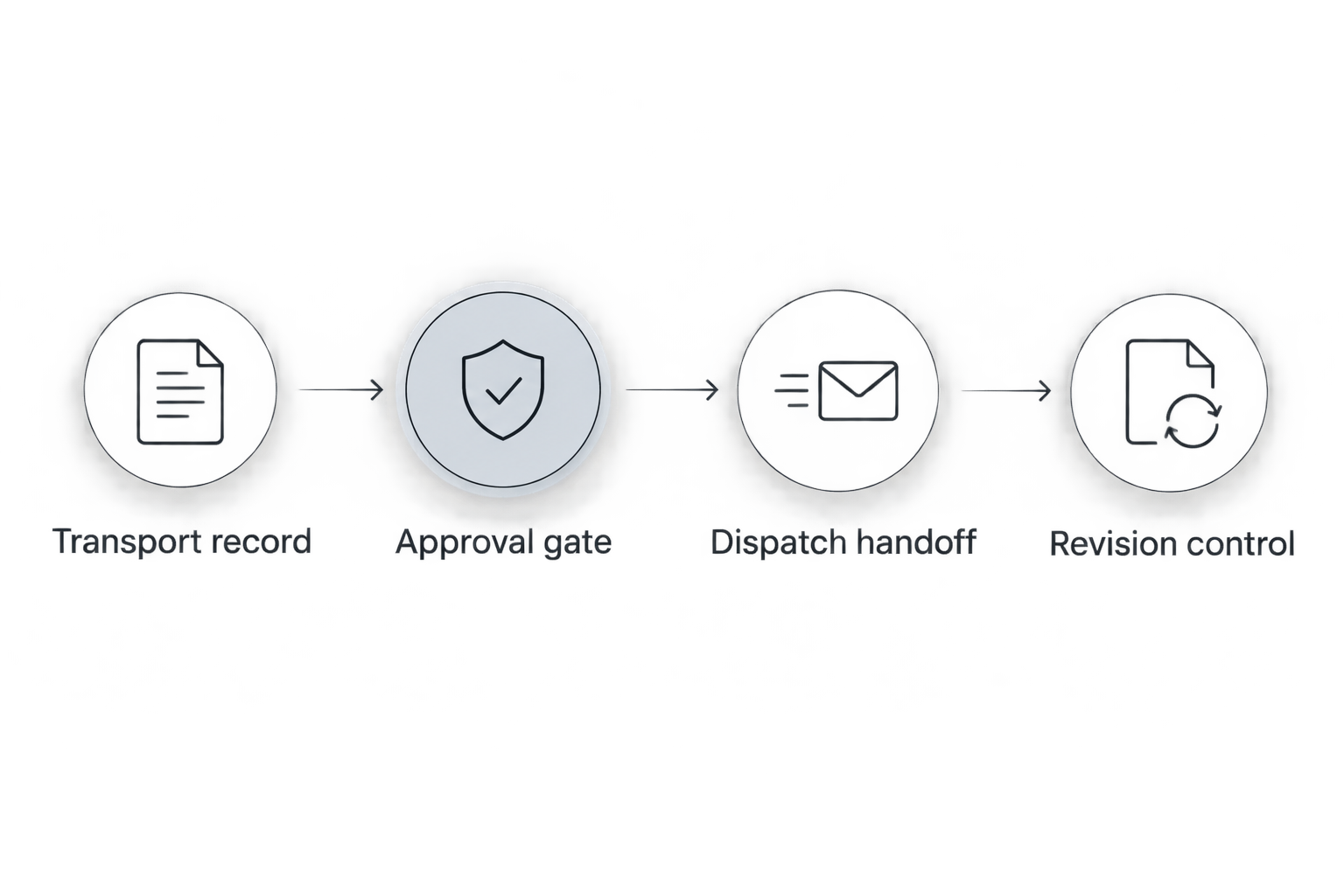
Revision control
Keep the booking aligned with the meeting
- Assign Change owner and maintain Current revision in the transport record. Record the latest approved instructions rather than editing scattered copies.
- Compare each invitation update against transport-relevant fields: date, location, required arrival, passenger attendance, and return arrangements. Leave agenda-only changes inside the board portal.
- Write a concise Change summary showing the old instruction and its replacement. Include the existing booking reference and identify which journey leg changes.
- Obtain any required approval, then send an explicit amendment request. Ask dispatch to confirm the revised arrangement and any applicable change in terms before closing it.
- Update Acknowledged revision only after dispatch responds. Retain the prior revision according to your organization's retention policy, and issue the corrected passenger itinerary.
Expected result: A changed invitation produces a traceable amendment instead of an additional booking or an unnoticed mismatch.
Sent is not acknowledged. If the amendment remains unanswered, keep it visibly unresolved and escalate through the agreed operational contact route. Do not overwrite the confirmed pickup time with a proposed time and assume the journey has changed.
At the start of each 2026 board cycle, test this handoff with a clearly marked internal rehearsal. Walk through a location change, an absent approver, and a canceled meeting without sending a live booking instruction.
When the board invitation is updated
The adjacent workflow is an amendment review. Use it whenever a revised invitation arrives, but send instructions to dispatch only when the approved transport requirement changes.
Choose the workflow by event type, not by how urgent the email looks. Both paths need an owner, a clear approval decision, and acknowledgment; their outputs differ.
| Workflow | Best for | Advantage | Limitation | Required output |
|---|---|---|---|---|
| New-booking handoff | A confirmed meeting occurrence with a new transport requirement | Establishes the full journey and approval record | Requires the initial operational details before confirmation | Accepted booking reference |
| Amendment review | A changed meeting with an existing transport booking | Keeps changes attached to the correct journey | Requires comparison with the last acknowledged instructions | Acknowledged revised instruction |
For an automated internal review, use only an approved notification or export method supported by your organization. Limit its role to creating a review task until the full approval and acknowledgment process has been validated. Do not let a changed calendar subject independently authorize transport.
A meeting cancellation also needs review. The director might still require an airport transfer or another journey. Confirm what should stop, submit the relevant cancellation request, and retain the acknowledgment and applicable terms.
Troubleshooting
The update creates a duplicate request
Match the meeting occurrence, passenger, journey leg, and existing booking reference before issuing instructions. If the record already has a confirmed booking, use the amendment path. A renamed meeting should not become a new transport requirement merely because its subject changed.
Pickup time shifts across time zones
Compare the invitation's event time zone with the pickup location's local time zone. Restate the full date and local zone in the transport extract, then ask dispatch to acknowledge that instruction. Do not resolve ambiguity by forwarding a screenshot without explanation.
The meeting venue is correct, but the entrance is wrong
Verify the vehicle entrance with the venue contact. Update Vehicle entrance separately from Destination address, then send the correction against the existing booking reference. Include only access information necessary for the movement; do not circulate unrelated building instructions.
A revised return time has no acknowledgment
Keep the last confirmed instruction visible and label the proposed change as unresolved. Contact the operational desk through the agreed route and request a clear response. Tell the passenger's coordinator which instruction remains confirmed rather than presenting the proposal as settled.
The approver is unavailable
Route the request to the named backup within your organization's approval rules. If no authorized backup exists, keep the booking or amendment pending. An approaching meeting does not establish purchasing authority, and a calendar organizer is not automatically the transport approver.
Customize your workflow
Extend the approved record to airport arrivals, hotel pickups, and onward meetings without combining them into an ambiguous all-day note. Give each journey leg its own timing, passenger list, destination, and confirmation status. Keep a shared meeting reference so the coordinator can see the complete program.
For airport legs, record the flight details and request flight tracking. For a flexible departure after the board meeting, discuss the appropriate service arrangement and applicable terms before confirming it. Do not interpret a meeting end time as a guaranteed passenger release time.
Chauffyr is a US-based executive chauffeur partner serving 120+ airports across 50+ countries through vetted chauffeurs and affiliates. Chauffyr is best suited to executive assistants who want board travel coordinated through one 24/7 desk. The advantage is a common coordination point; the limit is that meeting decisions still require your authorized approver and an acknowledged transport instruction.
Chauffyr provides airport transfers, hourly charters, and point-to-point travel, with consolidated billing for corporate accounts. Choose the service scope against the actual itinerary rather than assuming one arrangement covers every board program. Use the contact page to arrange travel and confirm the operational requirements for your 2026 schedule.
FAQ
How do I turn a board portal invitation into a chauffeur booking?
Create a separate transport record, obtain approval, and send an explicit booking instruction to dispatch. Close the handoff only after receiving a booking reference and acknowledgment of the approved journey details.
Should I forward the full board invitation to the chauffeur?
Send a transport extract instead of the full board invitation. Include the necessary pickup, passenger, timing, and contact details while excluding board papers, agenda content, and unrelated attendees.
Can a board meeting update automatically change the chauffeur booking?
Treat a board meeting update as a review trigger, not an automatic booking amendment. Confirm that transport requirements changed, obtain the required approval, and request acknowledgment against the existing booking reference.
Which time should I send to chauffeur dispatch?
Send the required arrival time and the agreed pickup time, with the date and local time zone for each movement. Keep the meeting start separate so dispatch does not have to infer the arrival requirement.
What happens if the board meeting runs late?
Contact dispatch against the existing booking reference and request a revised arrangement. Confirm applicable terms and obtain acknowledgment before telling the passenger that a later departure is arranged.
Does Chauffyr provide board meeting chauffeur dispatch worldwide?
Chauffyr provides US-based coordination for executive chauffeur travel at 120+ airports across 50+ countries through vetted chauffeurs and affiliates. Confirm the specific itinerary and service arrangements with the desk before booking.
Does canceling the meeting cancel the chauffeur booking?
Canceling the meeting is not confirmation that the transport booking is canceled. Review which journeys remain necessary, submit an explicit cancellation request for the affected booking, and retain the response and applicable terms.
One last thing
Add a passenger-readiness check that is independent of the meeting invitation. A correct pickup instruction still fails operationally if the passenger receives an obsolete itinerary or does not know whom to contact. Before travel, have the coordinator verify that the passenger summary matches the last dispatch-acknowledged revision—not simply the latest calendar update.