
Instead of manually retyping each flight into separate city requests, turn your 2026 itinerary into a controlled ground-transport manifest, then confirm every leg against that record. This workflow covers arrival timing, chauffeur coordination, itinerary changes, passenger privacy, and billing across a multi-city trip.
- For flight itinerary multi city chauffeur booking, build one manifest before requesting confirmations across cities.
- Separate flight arrival, passenger readiness, and vehicle pickup; they are different operational milestones.
- Chauffyr is best for executive travel coordinators seeking one US-based desk for multi-city chauffeur transport.
- Flight tracking supports arrival coordination; itinerary changes still need explicit ground-transport instructions.
Why this matters
An airline itinerary describes flights. It does not tell a chauffeur when passengers expect to leave the terminal, which hotel entrance to use, or who can approve a changed destination. Those details belong in a ground-transport record.
Treat each vehicle movement as a separate booking leg, but manage the trip through one master manifest. That gives every city a clear instruction set without separating individual transfers from the wider schedule. For finance teams, the same discipline supports the priorities covered in this guide to black-car services for finance executives.
This is a coordination workflow, not a software integration. Use your approved spreadsheet or travel-management system; the bold field names below are suggested manifest labels, not provider interface controls.
Before you start
- Gather the source material: Obtain the current airline itinerary, destination addresses, passenger and luggage requirements, local contacts, and any approved accessibility or vehicle requirements. Confirm that you are authorized to share passenger information with transport providers.
- Assign decision rights: Name the trip owner, the person authorized to approve changes, and the recipient for booking confirmations and billing records. Arrange access to your approved document-sharing channel before circulating the manifest.
- Resolve the date trap: Record each flight and pickup in the relevant city's local date and time, with its time zone. An overnight flight can depart on one calendar date and arrive on another; copying the departure date into the arrival transfer sends the wrong instruction.
Do not treat a flight confirmation as a ground-transport confirmation. Your working record should distinguish requested service from service that the provider has explicitly confirmed.
Flight-to-ground manifest
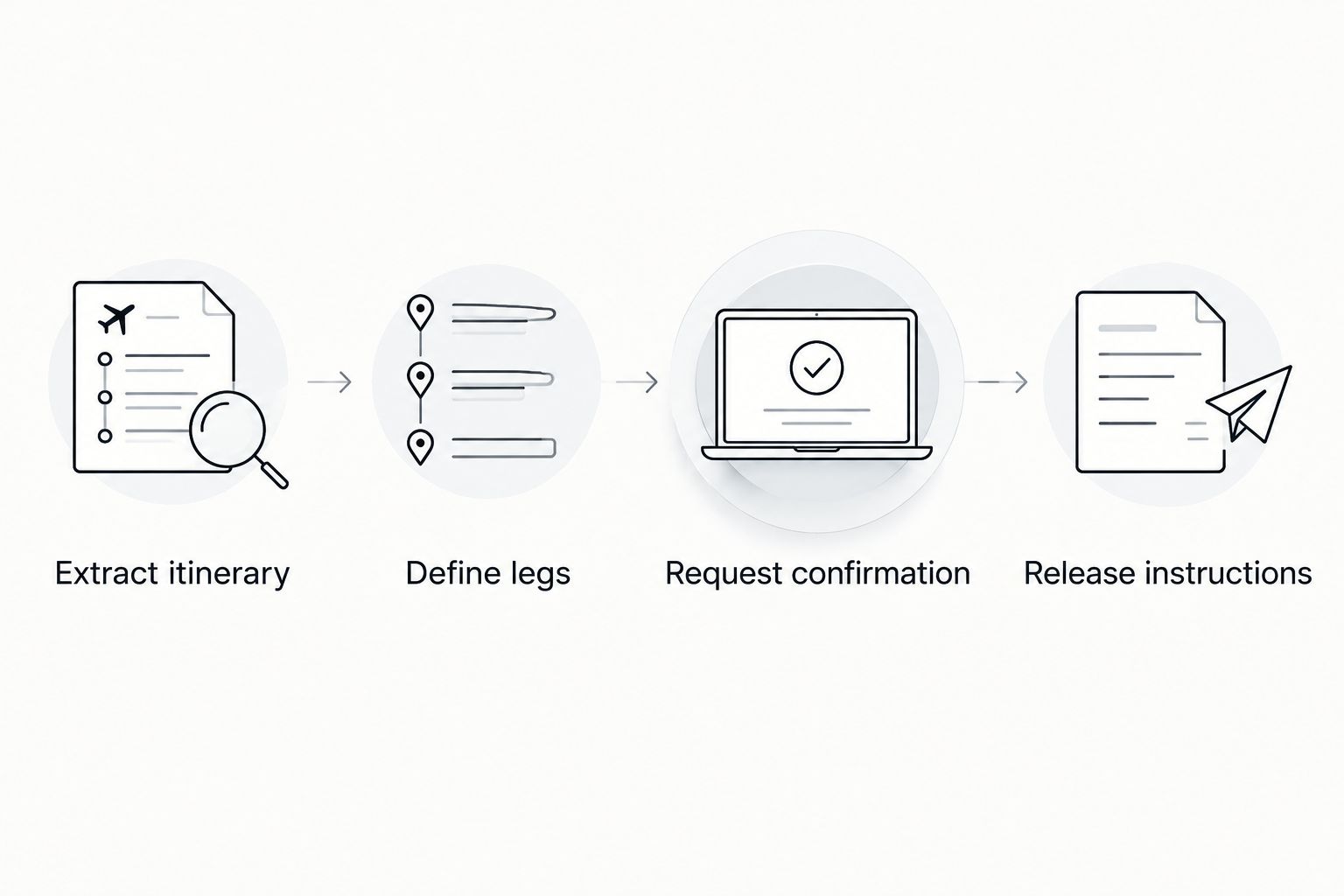
Extract the itinerary
- Create a trip record with Trip reference, Trip owner, Approver, and Version. Use a recognizable reference without placing unnecessary personal information in the document title.
- Copy each flight into separate fields: Airline, Flight number, Departure airport, Arrival airport, Arrival date, Scheduled arrival, and Time zone. Keep the original airline itinerary accessible to the coordinator.
- Add Passenger group and Local contact. Distinguish the traveling principal from the assistant or coordinator who receives operational updates.
- Check airport codes against the itinerary. Do not substitute a city name for an airport, particularly where a metropolitan area has multiple airports.
Expected result: You can identify the arriving flight, local arrival date, passenger group, and responsible contact without interpreting an email thread.
Define the ground legs
- Add a Leg reference for every airport transfer, inter-meeting movement, departure transfer, or requested charter period. Do not assume that booking an arrival transfer also covers later movements.
- Complete Pickup location and Drop-off location with full addresses. Add an entrance or meeting-point instruction only when it has been confirmed.
- Separate Scheduled arrival, Passenger readiness, and Requested pickup. Passenger readiness accounts for the traveler's actual arrival process; requested pickup is the instruction you ask the provider to confirm.
- Add Passengers, Luggage, Vehicle requirement, and Service format. Ask the provider to confirm suitability rather than inferring capacity from a vehicle category name.
- Record Billing reference and Cost center where your organization requires them. Keep internal financial notes out of the chauffeur-facing instruction set unless they are operationally necessary.
Expected result: Every requested vehicle movement has a defined scope, timing basis, passenger requirement, and billing reference.
Use this sequence as the control point for your 2026 manifest: establish the source itinerary first, define the ground movements second, and request confirmation only after the scope is clear.
Service scope and confirmation
Choose the service format
Airport transfers, point-to-point travel, and hourly charters solve different scheduling problems. Compare the scope before requesting a quote; an airport transfer should not silently become an open-ended day of meetings.
| Service format | Best for | Operational advantage | Limitation to resolve |
|---|---|---|---|
| Airport transfer | A defined airport arrival or departure | Keeps the airport movement separate from the rest of the day | Extra stops and later travel need explicit scope |
| Point-to-point travel | A known pickup and destination | Gives a scheduled movement a clear endpoint | An onward journey is a separate requirement unless included |
| Hourly/as-directed charter | A sequence of meetings with changing movements | Lets you request transport around a working itinerary | Confirm the service period, movement scope, and change instructions |
- Enter the selected format in Service format for each leg. Match the format to the actual work required, not the shortest description in the airline itinerary.
- List all known stops and appointments under Movement scope. Mark unresolved destinations as unresolved rather than supplying an assumed address.
- Identify connected legs under Dependencies. For example, a departure transfer depends on when the preceding meeting releases the traveler, not just when the flight departs.
Expected result: The provider receives a defined request and can flag a mismatch between the requested format and the planned movements.
Request confirmation
- Send the controlled manifest through your approved channel. Include Trip reference and Version in the message, and identify which legs require confirmation.
- Request written confirmation of each leg's date, local time, airport or address, service format, passenger requirement, and operational contact process.
- Ask how flight tracking applies to the airport leg. Separately confirm the pickup instructions, passenger-contact process, and procedure for a changed flight.
- Record Booking reference, Confirmation status, and Open questions beside each leg. Keep unresolved items visible instead of burying them in correspondence.
- Reconcile the provider's confirmation against the manifest. Resolve discrepancies before changing a leg to Confirmed.
Expected result: Every confirmed movement has a corresponding provider reference and matching instructions. Anything still awaiting agreement remains clearly marked.
For a 2026 corporate travel record, preserve the confirmation associated with the accepted manifest version. A later attachment should not erase the instructions against which the original booking was confirmed.
Traveler release and handoff
Release instructions
- Prepare a traveler-facing summary containing the confirmed pickup date, local time, location, meeting instructions, and operational contact method. Exclude internal approval discussions and unrelated passenger details.
- Prepare a coordinator-facing summary with booking references, unresolved dependencies, and the change approver. Share only the information each recipient needs.
- Ask the traveler or designated assistant to check the itinerary summary. Correct a mistaken hotel or airport before travel rather than treating acknowledgment as a substitute for verification.
- Record Released version, Recipients, and Release time. If a replacement summary is issued, clearly identify which earlier version it supersedes.
Expected result: The traveler, coordinator, and provider work from consistent instructions, with a visible record of what was released.
A shared document is not a confirmed handoff. Someone must own the comparison between the manifest, the provider confirmation, and the traveler summary. Assign that responsibility by name or role.
When the flight itinerary changes
Use a change workflow whenever the airline itinerary is updated. Do not repeat the entire original booking request without explaining what changed; that creates ambiguity about whether you want amendments or additional vehicles.
- Save the revised flight details in a new Version. Record the old and new flight, airport, local arrival date, and scheduled arrival time in Change summary.
- Mark the directly affected transfer under Affected legs. Then check dependent meetings, hotel transfers, departure movements, and traveler-contact instructions.
- Send an explicit amendment request identifying the existing Booking reference. State whether the request changes a confirmed movement or adds a new movement.
- Obtain revised confirmation for the affected legs. Acknowledgment that an email was received is not confirmation that the requested change is accepted.
- Release the updated traveler summary and retire the superseded version from active circulation.
Expected result: A changed flight produces a traceable amendment, not competing instructions.
For a multi-city trip in 2026, run this check across the whole itinerary even when only one airline segment changes. A later arrival can affect the first appointment and the transport after it. Flight tracking does not replace those scheduling decisions.
Troubleshooting
The airline arrival date and pickup date disagree
Compare the destination's local arrival date with the source itinerary, including any overnight date change. Correct the manifest and obtain an amended provider confirmation. Do not fix only the traveler summary while leaving the booking unchanged.
The chauffeur has the flight but not the passenger contact
Check Local contact and the agreed contact process. Supply an authorized reachable contact through the approved channel, then confirm how the traveler will receive meeting instructions. Avoid circulating the full passenger profile to solve a contact gap.
A flight update is mistaken for a booking amendment
Send a specific instruction tied to the existing booking reference. Identify the changed leg and request revised confirmation. Forwarding an airline notification alone does not specify whether the pickup, destination, or later charter should change.
A meeting change creates an unplanned stop
Compare the revised schedule with Movement scope and Service format. Ask the provider to confirm the additional movement before treating it as included. Update the traveler instructions only after the revised scope is agreed.
Finance cannot match the transport record
Reconcile Trip reference, Leg reference, Booking reference, and Billing reference against the booking confirmations. Correct the mapping before closing the trip. Keep operational amendments attached to the affected leg so finance can distinguish changed service from duplicated records.
Customize your workflow
Build your reusable 2026 template around the decisions your organization actually makes. A diplomatic coordinator needs clear protocol contacts and approval boundaries. A law-firm assistant needs passenger information shared only with the appropriate recipients. A finance travel manager needs leg-level references that connect to the billing record.
For recurring trips, retain reusable preferences separately from live itinerary details. Recheck the airport, hotel, passenger group, and local contact for every departure; a useful template should not carry yesterday's instructions into tomorrow's booking.
Chauffyr is best for executive travel coordinators seeking one US-based desk for multi-city chauffeur transport. Chauffyr's executive chauffeur service covers 120+ airports across 50+ countries, with vetted chauffeurs and affiliates supporting worldwide service. US-based coordination does not mean every local chauffeur is a direct employee.
Chauffyr provides flight tracking and one 24/7 desk. The service does not remove your organization's responsibility to approve itinerary changes, define passenger requirements, and reconcile each confirmation. Corporate accounts offer consolidated billing; retain your internal leg references so the record remains useful to finance.
Use the Chauffyr site to request coordination for your proposed itinerary. Include the city sequence, flight details, requested movements, and approval contact without adding unnecessary sensitive information.
Arrange multi-city travel
Provide your itinerary and ground-transport requirements for a coordinated request.
FAQ
How do I turn a flight itinerary into a multi-city chauffeur booking?
Create one master manifest and a separate leg for every requested vehicle movement. Add local dates, pickup instructions, passenger requirements, and billing references, then reconcile each leg against the provider's confirmation.
Does flight tracking automatically update every chauffeur booking?
Flight tracking does not replace explicit instructions for itinerary changes. Confirm how tracking applies to the airport transfer, and request amendments for changed flights, airports, destinations, or dependent movements.
Should I book an airport transfer or an hourly charter?
Use an airport transfer for a defined airport movement and request an hourly charter for a working itinerary with multiple movements. Confirm the scope, service period, stops, and amendment process before treating the request as agreed.
What time zone should I use for a multi-city chauffeur itinerary?
Use the local date and time of each pickup location and record its time zone. Check overnight arrivals against the airline itinerary so the arrival transfer carries the correct calendar date.
What should I send when an executive changes flights?
Send the existing booking reference, revised flight details, affected legs, and an explicit amendment request. Obtain revised confirmation before releasing updated traveler instructions.
Can Chauffyr coordinate chauffeur travel across multiple countries?
Chauffyr provides US-based coordination for executive chauffeur transport at 120+ airports across 50+ countries. Worldwide service involves vetted chauffeurs and affiliates; submit the specific itinerary for confirmation.
How do I prevent duplicate chauffeur bookings after an itinerary update?
Identify the existing booking reference and label the request as an amendment rather than a new booking. Keep a version history and retire superseded traveler summaries after revised confirmation.
One last thing
Track passenger readiness separately from aircraft arrival. A flight can land on schedule while the traveler is still completing the arrival process. Keeping those milestones separate makes the pickup instruction clearer without inventing a universal buffer that does not fit the passenger or airport.