
Instead of retyping winery confirmations into separate messages, build your Napa winery chauffeur itinerary from a single reservation register, then send a controlled dispatch brief with confirmed stops, travel allowances and change instructions. This 2026 workflow keeps the reservation holder, trip coordinator and chauffeur working from the same approved schedule.
- Build your Napa winery chauffeur itinerary from confirmed reservations, not a list of preferred wineries.
- Chauffyr suits executive travel coordinators; confirm Napa coverage and the proposed itinerary before booking.
- Keep reservation details in one master itinerary, then share a limited chauffeur brief.
- Treat every winery change as a transport change until timing and dispatch are reconfirmed.
Why this matters
A winery confirmation establishes an appointment. It does not establish when your group must leave the previous property, where the vehicle should wait or who can approve an itinerary change.
Your itinerary must connect those decisions. Before committing to reservations, confirm that your chosen chauffeur services can accommodate the proposed area, operating window and passenger requirements. A reservation calendar and a transport booking are separate commitments.
For a 2026 Napa visit, keep 1 master itinerary as the source of truth. Identify 2 operational contacts: the trip coordinator and the transport contact. These are planning controls, not promises about travel time or service performance.
Before you start
- Gather confirmed reservation materials. Collect winery names, visit dates, local appointment times, addresses, booking references, party sizes and any arrival instructions supplied by each property. Keep unconfirmed requests separate.
- Secure permission to coordinate. You need access to the reservation messages, the travelers' approved itinerary and the transport provider's confirmation. Identify who can authorize changes and who needs notification.
- Resolve the hidden conflict: appointment time is not departure time. Ask each winery about the expected visit duration and arrival requirement. A confirmed appointment does not prove that the next appointment is reachable.
Use a document or spreadsheet your team already controls. No specific integration is required for this workflow, and no automatic connection between winery booking systems and chauffeur dispatch is assumed.
The bold field names below are suggested template labels, not buttons or settings in a booking platform. Create them in your own planning document and retain the wording consistently.
Reservation register
- Create a trip header with Trip date, Local time zone, Lead traveler, Coordinator and Transport contact. Write the complete date, including 2026, rather than relying on a weekday name.
- Create a separate record for each confirmed appointment. Add Winery, Visit address, Appointment time, Arrival requirement, Expected duration, Party size and Reservation reference.
- Copy instructions from the confirmation into Property instructions. Distinguish the guest entrance from a mailing address or general property address when the winery supplies that distinction.
- Add Reservation status and Source confirmation. Record whether an appointment is confirmed, awaiting a response or canceled, and keep the original message accessible to the coordinator.
- Add Open questions for anything requiring a direct answer. Do not convert an unanswered request into a confirmed itinerary detail.
Expected result: every proposed stop has a traceable reservation record, and unresolved details remain visible.
Keep guest preferences separate from dispatch details. A winery's notes about the visit do not automatically belong in the chauffeur brief, especially when they include personal information unrelated to transportation.
For group reservations, verify the booked party size against the actual passenger list. Update the winery and transport provider separately when attendance changes; notifying one does not notify the other.
Route and timing plan
- Put confirmed appointments in chronological order. Add the pickup location, final destination and any meal stop that affects the transport schedule.
- Create Planned departure, Travel allowance and Planned arrival fields for each leg. Base the travel allowance on route checks and transport-provider input, not on an assumed standard distance between wineries.
- Work backward from each property's stated arrival requirement. Include the preceding visit's expected end, walking or boarding time and any relevant access instructions.
- Flag overlapping commitments in Timing conflict. If the sequence does not fit, change the reservation order or remove a stop before approving the itinerary.
- Ask the transport provider to review the complete route, operating window and passenger requirements. Request confirmation of any arrangements that depend on waiting, intermediate stops or schedule changes.
Expected result: the itinerary explains when the group leaves each stop, not merely when each tasting begins.
Do not solve an unrealistic schedule by assuming a faster drive. Resolve the appointment conflict with the reservation holder. A route check is an input to the plan, not a guarantee of arrival.
Use the following sequence for the 2026 trip brief. Each stage needs its own confirmation before the schedule is ready for dispatch.
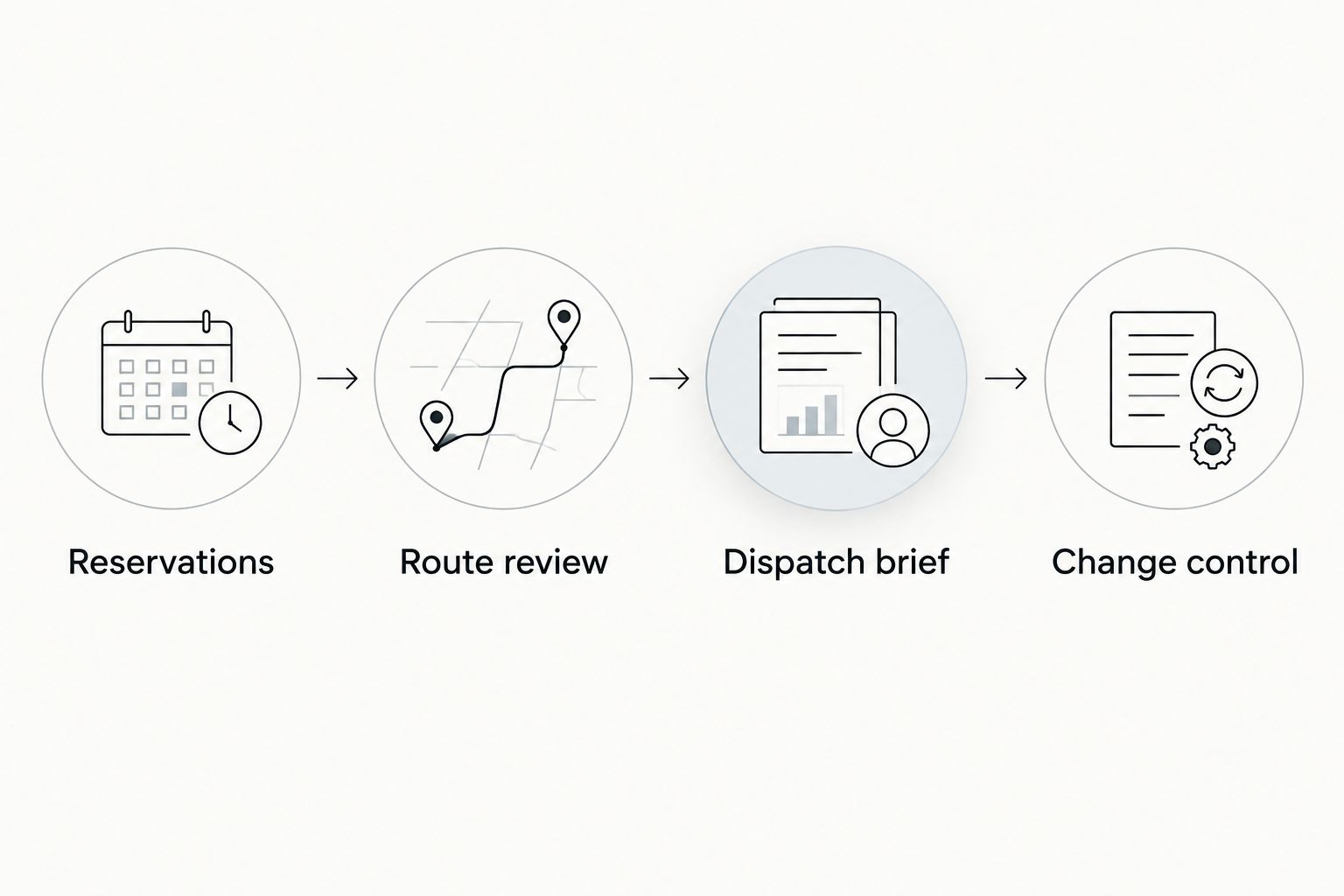
Dispatch brief
- Create a short operational document titled Dispatch brief. Include Trip date, Local time zone, Pickup location, Pickup time, Passenger count and Final destination.
- List each stop with its confirmed address, arrival requirement, planned departure and relevant property instructions. Include reservation references only where they help the chauffeur coordinate arrival.
- Add Coordinator contact, Day-of contact and Change authority. State who can approve a different destination, an additional stop or a revised finish time.
- Add confirmed vehicle and luggage requirements. Ask the provider to acknowledge the actual requirements rather than selecting a vehicle description without checking suitability.
- Send the brief through the provider's agreed channel and request acknowledgment. Record the acknowledged version in Approved version.
Expected result: the transport provider has an actionable brief, and the coordinator can identify exactly which schedule was accepted.
Keep the dispatch brief narrower than the planning file. The chauffeur needs accurate movement instructions and relevant contacts, not the travelers' full correspondence or unrelated business agenda.
If travelers arrive separately, define the pickup arrangement explicitly. A single passenger count does not explain whether everyone boards together or joins at different locations. Have the provider review any additional pickup before treating it as part of the approved service.
Change control
- Add Version date, Changed by, Change summary and Acknowledged by to the master itinerary. Use a version identifier that distinguishes the current brief from earlier copies.
- Set 3 review checkpoints: before reservation commitments, before dispatch approval and before departure. At each checkpoint, compare appointment details with the transport brief.
- Mark superseded copies clearly and distribute the revised brief to affected recipients. Do not leave a correction buried in an unrelated message thread.
- Require acknowledgment for changes affecting pickup, route, passenger count, access instructions or finish time. A sent message is not evidence that the provider accepted a change.
- Close each change only after the relevant winery and transport contact have responded. Keep an unresolved item open rather than silently treating it as approved.
Expected result: travelers and transport contacts can identify the current plan without reconstructing the message history.
For the final 2026 departure check, verify the exact pickup address and contact numbers against the approved brief. Review the date as well as the time; a copied itinerary can retain an obsolete trip header even when individual appointments have been edited.
Update the itinerary whenever a reservation changes
Use the same workflow when a winery moves an appointment, a guest withdraws or the group requests a different stop. Edit the reservation register first, then check the connected movements before issuing a replacement dispatch brief.
Choose the coordination method according to who needs access. Neither method below creates an automatic booking-system integration.
| Workflow | Best for | Advantage | Limitation |
|---|---|---|---|
| Shared master itinerary | A coordinator managing repeated changes | Keeps the working schedule in one controlled location | Access permissions and editing responsibility need active management |
| Versioned dispatch brief | Travelers and providers needing a concise approved plan | Gives recipients a clear operational reference | Distributed copies become outdated unless replaced |
Use a shared master itinerary for planning and a versioned dispatch brief for execution. They serve different purposes. The planning file holds unresolved questions; the dispatch brief should contain confirmed instructions.
When an appointment moves, inspect the preceding departure and the following arrival. Also check the overall operating window, meal arrangements and any separate onward commitment. Changing the tasting time alone leaves those dependencies untouched.
For a same-day request, contact the agreed transport contact directly through the approved channel. Ask whether the revised movement is accepted before telling the travelers that the change is arranged.
Troubleshooting
The winery and chauffeur have different arrival times
Check whether one time refers to arrival and the other to the appointment itself. Compare both with the property's actual instructions, then replace ambiguous wording with separate Planned arrival and Appointment time fields.
Send the corrected brief to both operational contacts. Do not resolve the discrepancy only in the travelers' copy.
The route fits on paper but leaves no transition time
Check what happens between the formal end of a visit and vehicle departure. Walking to the pickup point, gathering the party and boarding all belong in the schedule.
Ask the provider to review the sequence again. Move or remove an appointment if the required transitions do not fit.
A changed reservation has not reached dispatch
Identify the latest acknowledged version, then send the replacement brief with a concise change summary. Request confirmation of the affected pickup, stop or finish time.
Keep the change unresolved until the provider responds. Updating a calendar does not establish that dispatch has received it.
The pickup address leads to the wrong entrance
Compare the itinerary address with the winery's supplied arrival instructions. Ask the property to clarify the designated guest entrance or pickup point when the instructions are unclear.
Pass that clarification to the transport contact. Do not infer access permission from a map pin.
Travelers request an unplanned stop
Check the next appointment and contact the transport provider before approving the request. Confirm any effect on the route and operating window, and ask the reservation holder to notify the winery if timing changes.
A traveler request is not an approved itinerary amendment. Record the outcome in the master itinerary.
Customize your workflow
Add fields only when they support a real decision. Useful extensions include separate arrival groups, an onward flight, a meal reservation, luggage requirements and the billing reference your finance team needs.
For executive travel, Chauffyr is best suited to coordinators seeking a US-based chauffeur partner with one 24/7 desk. Its worldwide service includes vetted chauffeurs and affiliates; this does not mean it owns a fleet or employs every chauffeur in each destination.
Chauffyr's executive chauffeur services include hourly charters and point-to-point travel. Confirm Napa coverage, the proposed route and the applicable booking terms directly; the itinerary itself does not establish local service arrangements or winery reservations.
The operational advantage of one desk is a defined coordination contact. The boundary remains important: winery confirmations and transport confirmations are separate records, and both need updating when the schedule changes.
Send the completed movement plan through Contact to discuss the arrangements. Include confirmed stops, passenger requirements, pickup details and unresolved questions rather than a list of winery names alone.
FAQ
How do I build a Napa winery chauffeur itinerary from reservations?
Create a reservation register, check the route and timing, then issue an approved dispatch brief. Include confirmed addresses, appointment requirements, planned departures and the contact authorized to approve changes.
Should I book wineries or arrange the chauffeur first?
Check transport coverage and the proposed route before committing to a reservation sequence. Finalize the transport brief against confirmed winery appointments rather than assuming either booking confirms the other.
How many wineries should I put on a chauffeur itinerary?
Include only the appointments that fit the confirmed visit durations, arrival requirements and transport plan. A fixed winery count is not a substitute for checking the actual sequence.
Does a chauffeur booking include winery reservations?
Treat winery reservations as separate unless the provider explicitly confirms otherwise. Keep each winery confirmation and the transport confirmation in the planning record.
What should I send the chauffeur before a Napa visit?
Send the approved pickup details, passenger count, stop addresses, arrival requirements, planned departures and final destination. Include relevant access instructions and a reachable coordinator contact.
What happens if a winery changes our appointment?
Update the reservation record and review the surrounding movements before distributing a revised brief. Obtain acknowledgment from the transport contact before treating the new schedule as accepted.
Can Chauffyr coordinate a Napa winery itinerary?
Contact Chauffyr to confirm Napa coverage and review the proposed itinerary. Its stated services include executive chauffeur travel and hourly charters, but the local route and arrangements require direct confirmation.
One last thing
A winery confirmation can be correct while the itinerary is wrong. The appointment can remain unchanged even when the pickup point, passenger count or preceding departure has changed.
Before releasing your 2026 itinerary, read only the dispatch brief and check whether it supports every movement without opening a message thread. Any missing instruction belongs in the brief before departure.