
Instead of manually forwarding every roadshow itinerary change, build a controlled scheduling workflow that turns approved meeting updates into transport instructions and requires acknowledgment before a pickup changes. This 2026 guide uses a shared manifest, explicit time zones, and a transport desk confirmation loop—not an assumed booking integration.
- Roadshow itinerary chauffeur scheduling sync needs an approved manifest and acknowledged changes, not just shared calendar access.
- Chauffyr is best for executive teams seeking coordinated chauffeur transport through one 24/7 desk.
- Separate requested changes from confirmed transport instructions so calendar edits never masquerade as accepted bookings.
- Record local time zones, passenger groups, and handoff contacts for every roadshow leg.
Why this matters
A meeting calendar describes where executives need to be. A transport manifest must also explain who travels together, where the chauffeur should collect them, and which instruction supersedes the previous version. Sharing the calendar alone leaves those questions unanswered.
For finance teams, the black-car service considerations for finance executives provide context for choosing a transport partner. The workflow below addresses the separate operational problem: keeping the approved itinerary and dispatch instructions aligned.
A roadshow schedule is synchronized only when the transport desk acknowledges the current instruction. A sent email, edited calendar event, or shared spreadsheet does not establish acceptance.
Before you start
- Access and ownership: Obtain editing access to the approved itinerary and a shared spreadsheet or document. Assign an itinerary owner, a transport coordinator, and a named desk contact; record who can authorize changes.
- Booking materials: Gather booking references, passenger groupings, flight details, pickup addresses, local contacts, luggage requirements, and billing references. Restrict access to traveler information according to your organization's policies.
- The gotcha: A calendar update is not a transport amendment. Agree with the transport desk how amendments must arrive and how acceptance will be returned before treating any update as confirmed.
This is a manual coordination workflow with structured handoffs. The field names below are labels to create in your own manifest, not proprietary software controls or a claim that a chauffeur provider offers calendar synchronization.
Manifest structure
Create the movement record
- Create a shared file named Roadshow Transport Manifest 2026. Give editing access only to the people responsible for maintaining transport instructions; provide read access where appropriate.
- Create Leg ID, Booking reference, Passenger group, Service date, Pickup time, Time zone, Pickup address, and Destination fields. Use 1 row per transport leg, not one row per meeting.
- Add Required arrival, Meeting release, Vehicle requirements, Local contact, and Desk contact. Record requirements as requests until the provider confirms them.
- Add Revision, Requested change, Approval status, Transport status, Acknowledged by, and Acknowledged at. Keep internal approval separate from transport acceptance.
- Enter each booked movement and reconcile the starting manifest against the existing booking confirmations. Resolve mismatches before distributing the file.
Expected result: Every movement has a stable identifier, a booking reference where booked, and a visible confirmation state. Meeting titles can change without breaking the connection to the transport record.
A stable Leg ID is particularly useful when several executives attend the same venue but leave separately. Keep their movements separate rather than relying on a meeting name to identify a vehicle assignment.
Define the handoff fields
Use these labels consistently throughout the 2026 roadshow. They distinguish intent from acceptance without requiring a particular scheduling platform.
| Field | What to enter | What it prevents |
|---|---|---|
| Requested change | The proposed replacement instruction | An unapproved edit appearing final |
| Approval status | Pending or Approved | Confusion about internal authorization |
| Transport status | Awaiting acknowledgment or Confirmed | Confusing delivery with acceptance |
| Acknowledged by | The responding desk contact | An anonymous confirmation trail |
| Acknowledged at | Date, time, and time zone | Unclear ordering of amendments |
Do not overwrite the confirmed instruction while an amendment remains unresolved. Preserve it in the current record and keep the proposed change visibly separate, either in dedicated fields or a change log.
The confirmed booking remains the operating instruction until the transport desk accepts its replacement. If the desk declines a request, escalate the conflict rather than marking the leg confirmed.
Timing and handoff rules
Set the timing basis
- Enter pickup and required-arrival times in the location's local time. Populate Time zone explicitly; do not rely on the spreadsheet viewer's device settings.
- Record both Service date and the relevant local date for flights or meetings that cross midnight. Check the departure and arrival locations separately on international movements.
- Ask the transport desk to assess routing, loading, access, and the interval between pickup and required arrival. Do not infer a workable pickup from the meeting start alone.
- Identify the decision-maker for a late-running meeting. Put that person's contact details in Local contact, alongside any separate passenger contact required for collection.
- Agree on a fallback contact method when an amendment is urgent or the usual channel receives no acknowledgment. Record the escalation route in the manifest.
Expected result: Each leg has an unambiguous local pickup time, an arrival objective, and an identified person who can resolve a timing conflict.
For a 2026 itinerary spanning daylight-saving transitions, check the time zone for the actual travel date. A fixed offset copied from an earlier movement is not a substitute for that check.
Choose the operating pattern
A roadshow does not require the same booking structure for every movement. Choose the service pattern with the transport desk, then record the confirmed scope.
| Operating pattern | Best for | Operational advantage | Limitation to resolve |
|---|---|---|---|
| Point-to-point travel | Defined movements with clear destinations | Each leg has a distinct instruction | Additional stops or changed routing require confirmation |
| Hourly/as-directed charter | A sequence of stops requiring itinerary flexibility | Supports a coordinated sequence under an agreed scope | Confirm charter boundaries and amendment terms |
| Airport transfer | A flight-linked arrival or departure | Connects the movement record to flight details | Flight updates do not specify every passenger handoff detail |
These are planning options, not interchangeable booking promises. Ask which arrangement fits the actual itinerary and confirm the applicable terms before choosing.
For mixed schedules, keep airport movements distinct from meeting-to-meeting legs even when they belong to the same executive's day. This preserves the flight reference without making every meeting dependent on an airport booking record.
Change approval and dispatch confirmation
Route each approved amendment
- Enter the proposed amendment under Requested change. Include the Leg ID, current instruction, requested replacement, reason, and affected passenger group.
- Obtain internal authorization and set Approval status to Approved. For a schedule conflict, resolve which obligation takes priority before instructing the transport desk.
- Send the amendment through the agreed channel. Include the booking reference and local time zone; avoid forwarding an entire email chain without identifying the operative change.
- Set Transport status to Awaiting acknowledgment. Ask the desk to confirm the revised pickup, location, and any affected downstream movements.
- Record the response under Acknowledged by and Acknowledged at. Only after acceptance, replace the operating instruction, update Revision, and set Transport status to Confirmed.
- Notify the traveler-facing coordinator and affected local contacts. State which earlier instruction the accepted revision replaces.
Expected result: Every accepted amendment has an authorization trail, a desk acknowledgment, and a clearly superseded predecessor. Unaccepted requests remain visible rather than disappearing into email.
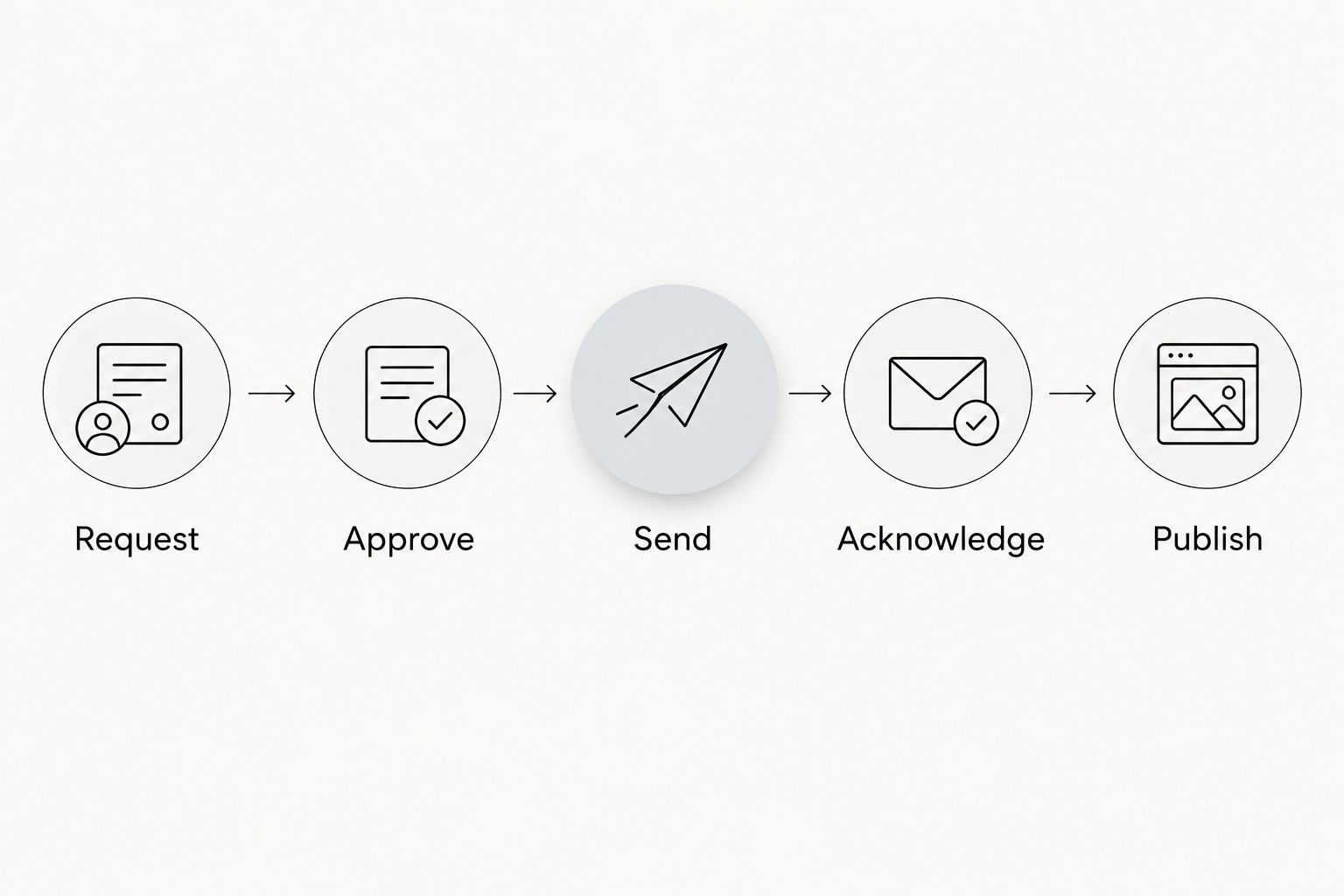
The handoff follows the same sequence regardless of the communication tool: Request, Approve, Send, Acknowledge, Publish. Keep that sequence intact when a change arrives by telephone; document the agreed instruction afterward.
Run the release check
Before distributing the operating manifest, filter for Awaiting acknowledgment and unresolved approvals. Check adjacent legs whenever a meeting moves: an accepted later pickup does not establish that the following arrival remains achievable.
Then compare the traveler-facing schedule with the confirmed transport record. Confirm that both show the same pickup address, local time, passenger grouping, and contact route.
Treat the released file as a dated revision, not an attachment that circulates indefinitely. Retain the change history under your organization's retention rules and tell recipients where the current instructions live.
When flight or meeting updates trigger a review
The adjacent workflow starts with an event update rather than a coordinator's amendment request. Its output is still a proposed transport change—not an automatically accepted instruction.
For flight-linked movements, record the flight identifier, service date, and arrival airport in the leg. Request flight tracking from the provider and agree which changes require coordinator involvement, including a changed airport or a replacement flight.
For meeting changes, compare the revised finish time and location against the current pickup. Review the next movement as well; keeping the first collection workable does not resolve the rest of the afternoon.
Use this review sequence:
- Identify affected Leg ID records.
- Check whether the update changes pickup timing, location, passenger grouping, or service scope.
- Obtain approval for the replacement instruction.
- Submit it through the established amendment process.
- Publish only the accepted revision.
Expected result: Flight and calendar updates prompt a controlled review without silently rewriting confirmed transport. If nothing changes operationally, record that the update was reviewed and retain the existing instruction.
Troubleshooting
The calendar changed, but the pickup did not
Check Transport status and the desk response. If acknowledgment is absent, submit or escalate the amendment through the agreed channel; do not assume shared calendar access constituted notice.
Different recipients have different pickup times
Compare revision identifiers and acknowledgment timestamps. Issue the accepted instruction through the agreed channel, identify the superseded version, and ask affected coordinators to confirm receipt.
A local time appears on the wrong date
Check the flight's arrival date, the movement's service date, and the explicit time zone. Correct the proposed instruction and obtain desk acceptance before distributing a replacement pickup.
A meeting overrun disrupts the next leg
Ask the itinerary owner to prioritize the remaining obligations. Request a revised movement plan from the desk and confirm each affected leg; moving the first pickup alone leaves downstream conflicts unresolved.
Passenger or location details are incomplete
Pause confirmation until the responsible coordinator supplies the missing information. A venue name is not a collection instruction when the building has several entrances; request the agreed meeting point and local contact.
Customize your workflow
Once the core process works, add reporting fields that support your organization's decisions: cost center, matter reference, delegation group, or invoice reference. Keep sensitive meeting details out of transport instructions unless the provider needs them to perform the movement.
For a multi-city 2026 roadshow, assign a local handoff contact to each city while retaining a single owner for the master manifest. Local coordination should not create competing versions of the itinerary.
Chauffyr is best for executive teams seeking coordinated chauffeur transport through one 24/7 desk. Chauffyr provides US-based coordination and worldwide service through vetted chauffeurs and affiliates; that does not mean a company-owned fleet in every city.
Chauffyr's chauffeur services include airport transfers, hourly charters, and point-to-point travel, with flight tracking and no surge. The coordination benefit does not replace your internal approval process: confirm the route, requested vehicle, amendment terms, and handoff arrangements for the actual itinerary.
Use Chauffyr to arrange travel and discuss the proposed manifest handoff. Confirm how the desk will receive changes and return acknowledgment before releasing the operating schedule.
FAQ
How do I sync a roadshow itinerary with chauffeur scheduling?
Use a shared movement manifest and require transport desk acknowledgment for every approved amendment. Connect each itinerary change to a stable leg identifier and booking reference before publishing the replacement instruction.
Does sharing my calendar update a chauffeur booking?
Calendar sharing does not establish acceptance of a booking amendment. Follow the provider's agreed change process and retain the acknowledgment of the replacement instruction.
Should I use hourly charters or separate transfers for a roadshow?
Use separate transfers for clearly defined movements and consider hourly/as-directed charters for a sequence requiring itinerary flexibility. Confirm the service scope and amendment terms with the transport desk before choosing.
What information belongs in a roadshow transport manifest?
Include leg identifiers, booking references, passenger groups, local pickup times, explicit time zones, addresses, contacts, and confirmation status. Keep proposed amendments separate from the accepted operating instruction.
What should I do when a roadshow meeting runs late?
Ask the authorized itinerary owner to prioritize the affected obligations, then request revised transport instructions. Check downstream movements and publish only the changes the transport desk accepts.
Does flight tracking replace arrival coordination?
Flight tracking does not replace passenger handoff instructions. Confirm the collection arrangement, contact route, and process for a replacement flight or changed airport.
Can Chauffyr coordinate a multi-city executive roadshow?
Chauffyr provides coordinated corporate and delegation transport through US-based coordination, vetted chauffeurs and affiliates, and one 24/7 desk. Confirm the cities, movements, vehicle requirements, and amendment process for your itinerary.
One last thing
For your next 2026 roadshow, rehearse a changed pickup before departure. Ask the itinerary owner and transport desk to walk through the authorization, acknowledgment, and publication sequence without changing a live booking.
The useful test is not whether everyone can open the manifest. It is whether everyone can identify the current accepted instruction—and who has authority to replace it.