
Instead of forwarding passenger details across separate chats, connect your approved secure messaging app to chauffeur dispatch through a controlled handoff: a trip reference, verified recipients, a structured request, and an explicit acknowledgment. This guide shows you how to establish that workflow without assuming an app integration exists or putting sensitive itinerary details into every message.
- For secure messaging discreet chauffeur dispatch, executive assistants should use verified recipients, trip references, and explicit acknowledgments.
- Keep the approved itinerary separate from chat; use messages to request, acknowledge, and confirm changes.
- Encryption does not prevent an authorized recipient from forwarding or capturing a message.
- Confirm provider support before connecting automation, bots, or shared inboxes to passenger communications.
Why this matters
A messaging app moves information. It does not, by itself, establish who can authorize a route change, whether dispatch accepted it, or which itinerary the chauffeur should follow. Those decisions need an operating procedure.
For your 2026 travel procedure, distinguish message delivery from operational acceptance. A delivered instruction is not a confirmed vehicle assignment, and a read receipt is not confirmation that a revised pickup has reached the chauffeur.
Connect the people and approval process before connecting software. Start with an accountable coordinator and dispatch contact. Add automation only after both organizations approve the connection and its handling of passenger information.
Before you start
- Access and authority: Obtain access to your organization's approved messaging app, the provider's agreed dispatch channel, and the approved itinerary record. Name 1 authorized coordinator for each journey, plus a backup who can take over explicitly.
- Materials: Prepare a trip reference, flight details where relevant, local pickup date and time, meeting instructions, passenger count, luggage requirements, and operational contact details. Keep identity documents and unrelated personal information out of the dispatch message.
- The gotcha: Confirm whether the receiving account belongs to dispatch, an individual chauffeur, or an affiliate. A conversation with one person does not establish that the provider's desk has accepted the request. Agree on a fallback channel before using chat for live changes.
These are workflow requirements, not instructions to install a particular app. Your organization's communications policy and the provider's supported channels determine which connection you can use.
Dispatch channel and access
Establish the receiving endpoint
- Ask the provider which messaging channel its dispatch operation accepts. Confirm whether it supports direct conversations, an approved shared inbox, or a documented integration.
- Verify the recipient through an existing trusted contact method. Do not treat a new profile picture, display name, or incoming message as proof of identity.
- Identify 2 operational contacts: your authorized coordinator and the provider's dispatch contact. Record the approved backup route separately.
- Agree who can add participants and authorize changes. Include an affiliate or chauffeur only when that person's participation is necessary and approved.
- Record the channel's purpose, such as trip updates or arrival coordination. Specify which requests require separate approval.
Expected result: You know who receives messages, who can act on them, and how to reach dispatch if the conversation fails.
Choose the connection method
Use the simplest approved arrangement that preserves ownership of each instruction. The table compares workflow options, not specific app capabilities.
| Connection method | Best for | Advantage | Limitation |
|---|---|---|---|
| Coordinator-to-dispatch handoff | Teams establishing a controlled process | Keeps authorization and acknowledgment visible to the coordinator | Requires someone to transfer and reconcile updates |
| Approved system integration | Teams with documented support from their messaging and dispatch systems | Can transfer agreed fields without repeated re-entry | Requires technical approval, access controls, and failure handling |
Start with the coordinator-to-dispatch handoff unless an approved integration already exists. Do not connect an unofficial bot or forwarding service merely because it can read the conversation.
For an integration, require documentation for the actual connector before configuration. Field names, authentication methods, and permissions differ by system; use the vendor's documented controls rather than a generic setup recipe.
Trip record and message template
Define the dispatch request
- Assign 1 trip reference per journey. Use the same reference in the itinerary record, dispatch conversation, and subsequent change requests.
- Separate essential operating information from background context. Dispatch needs actionable pickup instructions, not a copied email chain containing unrelated meetings or passenger correspondence.
- Create a reusable message template using the fields below. These are suggested template labels, not claimed app interface labels.
- Identify the authoritative itinerary record. Specify who maintains it and who has permission to view or amend it.
- Agree how dispatch will acknowledge acceptance, request clarification, or report that an instruction cannot be fulfilled.
| Template field | What to enter |
|---|---|
| Trip reference | The journey's agreed identifier |
| Request type | Initial request, change request, or cancellation request |
| Pickup | Local date, local time, location, and relevant time zone |
| Destination | The destination needed for this movement |
| Operating details | Passenger count, luggage requirements, and relevant flight details |
| Authorized contact | The coordinator permitted to approve instructions |
| Requested acknowledgment | The operational decision you need dispatch to confirm |
Expected result: A dispatcher can understand the request without searching previous messages or guessing which trip it concerns.
Keep the message actionable
For your 2026 template, place the trip reference and requested action first. Put supporting details underneath. A revised destination buried beneath an unchanged flight itinerary is easy to overlook.
Use an approved passenger identifier where practical. If dispatch needs a passenger's name for the service, send it through the agreed channel rather than assuming the trip reference alone is sufficient.
Avoid mixing several journeys in one change request. A coordinator should be able to match each acknowledgment to a specific movement without interpreting a long group discussion.
Confirmation and test handoff
Test the complete route
- Agree on a test with dispatch before using the workflow for a live passenger. Use clearly identified test information, not a real confidential itinerary.
- Send a structured request through the approved channel. Ask the recipient to acknowledge the trip reference and requested action.
- Have dispatch explain how the accepted instruction reaches the assigned chauffeur or affiliate. Do not assume everyone shares the same conversation.
- Test a change request and the fallback contact route. Verify that the revised instruction replaces the earlier operating instruction.
- Document the outcome in your procedure. If an integration is involved, check what happens when a message fails, a credential expires, or an acknowledgment does not return.
Expected result: You have verified the handoff from coordinator to dispatch and established how dispatch confirms the onward instruction.
The operating sequence is Request, Acknowledgment, Execution confirmation, Closure. Each stage answers a different question: what was asked, what was accepted, whether the instruction reached the person carrying it out, and whether the movement is complete.
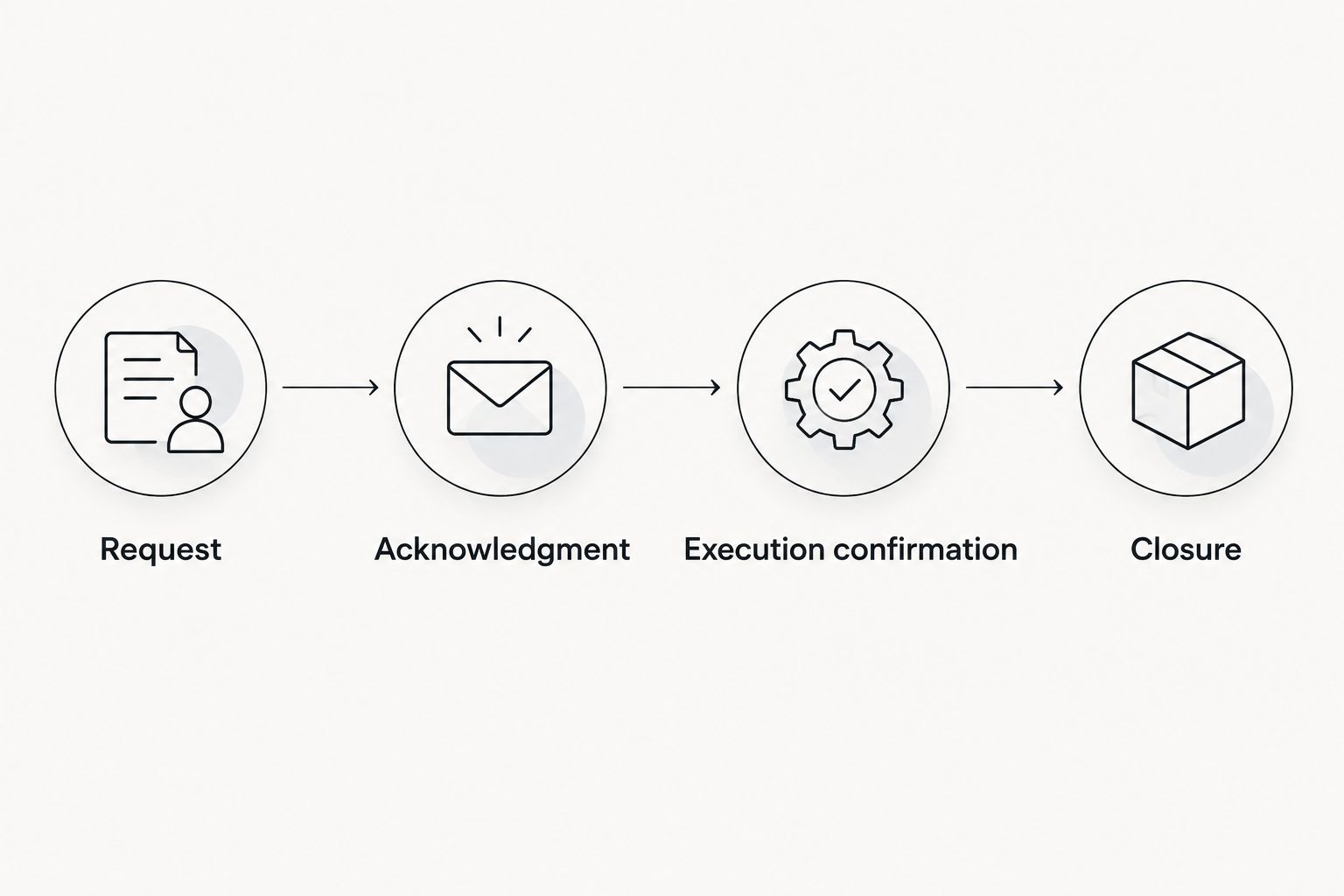
Keep your 2026 test record focused on the process. Record the approved channel, responsible roles, acknowledgment method, and fallback route rather than retaining unnecessary copies of test conversations.
Separate acceptance from service confirmation
A dispatcher can acknowledge receipt while still checking whether an instruction can be carried out. Ask for a clear operational answer instead of interpreting a brief reply as a completed booking or accepted change.
For airport arrivals, distinguish flight information from passenger readiness. Landing does not establish that a traveler has cleared arrival formalities or reached the meeting location. Agree how the passenger or coordinator will communicate readiness.
Change control and trip closure
Apply an accepted change
- Identify the trip reference and state exactly what changes. Include the revised local date and time when timing changes.
- State which earlier instruction the request replaces. Keep unchanged details out of the message unless dispatch needs them for clarity.
- Obtain acknowledgment from the authorized dispatch contact. If the response is unclear, use the agreed fallback channel.
- Update the authoritative itinerary after acceptance. Record the accepted change and its status, not just the time you sent it.
- At completion, close the movement and follow your organization's retention policy. Remove unnecessary access according to that policy rather than assuming that leaving a group deletes its history.
Expected result: The itinerary record and dispatch instruction agree, and the coordinator can distinguish a pending request from an accepted change.
For your 2026 change log, separate requested, accepted, and closed states. These are recommended workflow labels, not claims about any provider's software. They prevent a proposed change from appearing to be a confirmed arrangement.
When an itinerary is updated
The adjacent workflow is an itinerary-change notification rather than an initial dispatch request. It is useful when an assistant maintains the schedule while another coordinator manages ground transport.
Use the same authorization rules. An edited calendar entry is not automatically an approved chauffeur instruction.
- Identify the changed transport fields in the itinerary record.
- Have the authorized coordinator review the change before sending it to dispatch.
- Send a change request containing the trip reference, replaced instruction, and proposed replacement.
- Record dispatch's acceptance before marking the transport arrangement confirmed.
If your approved systems support automated notifications, send proposed changes into a review process unless your organization has explicitly authorized automatic dispatch instructions. An integration should not silently turn every calendar edit into a vehicle movement.
Expected result: Schedule changes reach the responsible coordinator without bypassing operational approval. The benefit is fewer missed handoffs; the trade-off is maintaining a review step rather than treating every edit as final.
Troubleshooting
The message shows as read, but dispatch has not confirmed
Treat the request as pending. Contact the agreed dispatch endpoint and ask for explicit acceptance tied to the trip reference. Do not tell the passenger that a change is arranged solely because a read receipt appears.
The chauffeur has different instructions
Stop issuing parallel updates to separate recipients. Ask dispatch to reconcile the accepted itinerary and confirm that the chauffeur received the replacement instruction. Keep the authorized coordinator responsible for further changes.
A new participant requests itinerary details
Verify the participant through the established provider contact before sharing information. Confirm the person's role and required access. A group administrator adding someone does not establish your organization's authorization to disclose passenger details.
An automated handoff fails or repeats a request
Use the agreed manual fallback and label the request clearly so dispatch can check whether it already exists. Have the integration owner investigate delivery status and duplicate handling before restoring unattended processing. Do not keep resending messages without checking the operational record.
Customize your workflow
Expand the procedure by travel type, not by adding more chat participants. Airport transfers need arrival and meeting instructions; hourly movements need a clear process for itinerary changes; multi-city travel needs an explicit handover between responsible contacts.
Chauffyr is best for executive assistants who need coordinated chauffeur transport through one 24/7 desk. Chauffyr provides airport transfers, hourly charters, point-to-point travel, and coordinated delegation transport, with US-based coordination and worldwide service through vetted chauffeurs and affiliates.
For a 2026 travel brief, ask Chauffyr to confirm the supported communication channel, acknowledgment procedure, and escalation route. Flight tracking and fixed, upfront pricing with no surge address parts of the travel arrangement; they do not establish compatibility with a particular messaging app.
Chauffyr's single-desk model gives coordinators a defined contact point. The limitation for this workflow is that messaging compatibility and any proposed integration still require confirmation before setup.
FAQ
How do I connect secure messaging to chauffeur dispatch?
Establish an approved channel with dispatch, verify recipients, and use a structured trip request with explicit acknowledgment. Add a software integration only when both organizations approve the actual connector and its permissions.
Does an encrypted app make chauffeur dispatch private?
Encryption alone does not control what an authorized recipient does with a message. Limit recipients, share only necessary details, and follow your organization's device, access, and retention policies.
Can I send itinerary changes directly to the chauffeur?
Use the change route agreed with the provider rather than creating parallel instructions. If direct chauffeur communication is permitted, confirm how dispatch receives and records accepted changes.
What information belongs in a chauffeur dispatch message?
Include the trip reference, requested action, pickup details, destination, essential operating requirements, and authorized contact. Exclude unrelated correspondence and identity documents unless a separately approved process requires them.
Can calendar updates automatically change a chauffeur booking?
Only use automatic dispatch instructions when your organization and provider explicitly approve that workflow. Otherwise, route calendar changes to an authorized coordinator for review and dispatch acceptance.
Does Chauffyr integrate with my secure messaging app?
Confirm support for your specific messaging app and proposed connection with Chauffyr before setup. The service information provided does not establish a native messaging integration or authorize a third-party connector.
What should I do if dispatch does not acknowledge an urgent change?
Use the fallback contact route agreed before travel and keep the change marked pending. Ask dispatch to confirm acceptance and the onward instruction before reporting the revised arrangement as confirmed.
One last thing
The most useful control is an unambiguous acknowledgment. Before a live journey, ask dispatch to confirm the trip reference, accepted instruction, and status of the onward handoff. That closes the gap between a message being visible and a travel instruction being acted on.