
Instead of retyping flight details into separate chauffeur requests, build a corporate travel platform chauffeur booking integration that turns approved itinerary data into a transport request, records the supplier’s confirmation, and flags changes for review. Keep booking approval separate from data transfer so an itinerary update never becomes an unintended reservation.
- A corporate travel platform chauffeur booking integration needs separate request, confirmation, and itinerary-change records.
- Use approved itinerary data; verify connector access before configuring automated chauffeur bookings.
- Chauffyr suits executive travel teams seeking chauffeur coordination through one 24/7 desk.
- Test changed flights and duplicate messages before releasing the workflow to travelers.
Why this matters
A flight reservation does not confirm ground transport. Your workflow needs a clear handoff between the travel platform, the person authorized to approve transport, and the chauffeur provider.
For your 2026 operating procedure, define who owns that handoff before choosing the connection method. A successful data transfer proves only that information moved; a supplier acknowledgment proves that someone received it. Neither replaces a booking confirmation.
Keep the service decision separate from the technical setup. Chauffyr provides executive chauffeur services; verify the proposed booking channel and its requirements before connecting your travel process.
Before you start
- Access and authorization: Obtain permission to read the relevant corporate travel records, create transport requests, and return booking references. Confirm which supported export, messaging, or integration methods each party permits.
- Booking materials: Prepare an approved traveler profile, flight itinerary, pickup and destination details, billing allocation, and an escalation contact. Ask the provider which information is required for each service type.
- The critical gotcha: Distinguish flight arrival from chauffeur pickup. Local dates, time zones, baggage collection, and meeting instructions belong in the request; copying the flight time into a pickup field creates an ambiguous instruction.
Do not configure an automatic submission until both sides agree on what constitutes a new booking, an amendment, and a cancellation. Permission to send itinerary data is not permission to change transport arrangements.
Choose the connection method
Use the least complex method that preserves approval, confirmation, and change handling. These are workflow options, not claims that a particular platform or transport provider supports every connection.
| Method | Best for | Advantage | Limitation |
|---|---|---|---|
| Supported direct connection | Teams with verified platform and supplier compatibility | Can pass structured records without retyping | Requires confirmed capabilities and field mappings |
| Approved automation middleware | Teams with permitted triggers and receiving channels | Can route requests and apply approval rules | Requires monitoring, access controls, and failure handling |
| Structured manual handoff | Teams without a verified technical connection | Keeps requests readable and reviewable | Requires a coordinator to submit and reconcile updates |
The structured manual handoff is the fallback when technical compatibility is unconfirmed. It is not a failed integration project: you can standardize the information and approval process before automating delivery.
For a 2026 rollout, document the chosen method and its limits. Record whether it supports creating requests only, returning confirmations, processing amendments, or handling cancellations. Do not label the entire workflow automated when a coordinator still completes those actions.
Itinerary source configuration
The bold field names below are suggested labels for your mapping worksheet, not claims about a platform’s interface. Use the actual controls documented by your platform when implementing the workflow.
- Identify the approved source. Select the itinerary record that your travel team treats as authoritative. Exclude draft searches and unapproved trip proposals from booking submission.
- Define the qualifying event. Specify whether an approved reservation, a coordinator’s approval, or another supported event starts the request. Use an event that reflects your organization’s authorization rules.
- Create a Trip reference. Carry the source reservation identifier into the transport record. Add a separate Journey reference for each distinct chauffeur movement so the return transfer does not overwrite the arrival transfer.
- Assign a Request owner. Name the coordinator responsible for reviewing incomplete details and following up on unconfirmed requests. Include a backup contact for absences.
- Restrict the data scope. Pass only the traveler and itinerary information needed for the transport task. Keep unrelated itinerary attachments and sensitive internal notes outside the handoff.
Expected result: An approved travel event creates a traceable transport work item, not an unreviewed chauffeur reservation. The work item identifies its source, its journey, and the person responsible for resolving exceptions.
Map the booking fields
Use a field map rather than relying on the order of text in an itinerary email. Separate the travel facts from the instructions that need human approval.
| Suggested worksheet field | What to capture | Validation before submission |
|---|---|---|
| Traveler contact | Authorized traveler name and operational contact | Confirm the contact can receive journey updates |
| Flight details | Flight identifier, airport, and arrival date | Check the correct flight segment and local date |
| Pickup instruction | Requested pickup location, time, and time zone | Distinguish the flight event from the meeting instruction |
| Journey details | Destination, passengers, luggage, and requested service | Resolve incomplete addresses and unclear requirements |
| Billing allocation | Authorized account reference and internal allocation | Confirm the billing owner accepts the allocation |
| Approval record | Approver, decision, and approved request version | Ensure approval covers the version being submitted |
Keep operational instructions explicit. A destination described only as the client’s office requires clarification; a coordinator should not expect an automated workflow or a chauffeur to infer the address.
Request and approval configuration
The approval gate protects itinerary control. It also creates a place to resolve vehicle requirements, meeting arrangements, and billing questions before a request reaches the provider.
- Create a Request draft. Populate the field map from the approved source. Leave unresolved requirements visibly incomplete rather than substituting assumptions.
- Apply validation rules. Hold the draft if the pickup date, time zone, destination, operational contact, or required billing information is missing. Route the exception to the request owner.
- Capture Approval. Present the complete journey for review. Include passenger and luggage requirements, service type, and any permitted privacy instructions.
- Submit the approved version. Send the request through the provider’s agreed channel. Preserve the exact submitted details and a submission timestamp in the transport record.
- Set the status to Awaiting confirmation. Do not mark the journey booked because an email was sent or an automation completed successfully.
Expected result: The provider receives a reviewed request with a stable reference. Your travel team can distinguish a draft, an approved submission, and a confirmed booking without interpreting an email thread.
This 2026 approval template should identify who can authorize material changes. An assistant authorized to arrange an airport transfer does not automatically have authority to add unrelated travel or approve a revised itinerary.
Confirmation and exception configuration
Connect the provider’s response to the original journey record. A confirmation stored only in an individual inbox leaves the wider travel team without a reliable booking status.
- Match the response. Use the journey reference and provider reference to associate the response with the correct request. Send unmatched responses to the request owner for review.
- Record Confirmation details. Preserve the confirmed service, pickup instructions, provider reference, and operational contact. Check that the response matches the submitted journey.
- Resolve differences. Hold traveler-facing confirmation if the accepted arrangements differ from the approved request. Obtain the necessary approval before treating the revised arrangement as final.
- Return the confirmed record. Update the permitted travel record or shared operational register. Give the traveler only the information needed for the journey.
- Create an Exception queue. Route rejected requests, delivery failures, unmatched replies, and unresolved amendments to a named owner. Keep them out of the confirmed list.
Expected result: Every confirmed journey has a provider reference and accepted instructions. Every unresolved request has an owner and a visible status.
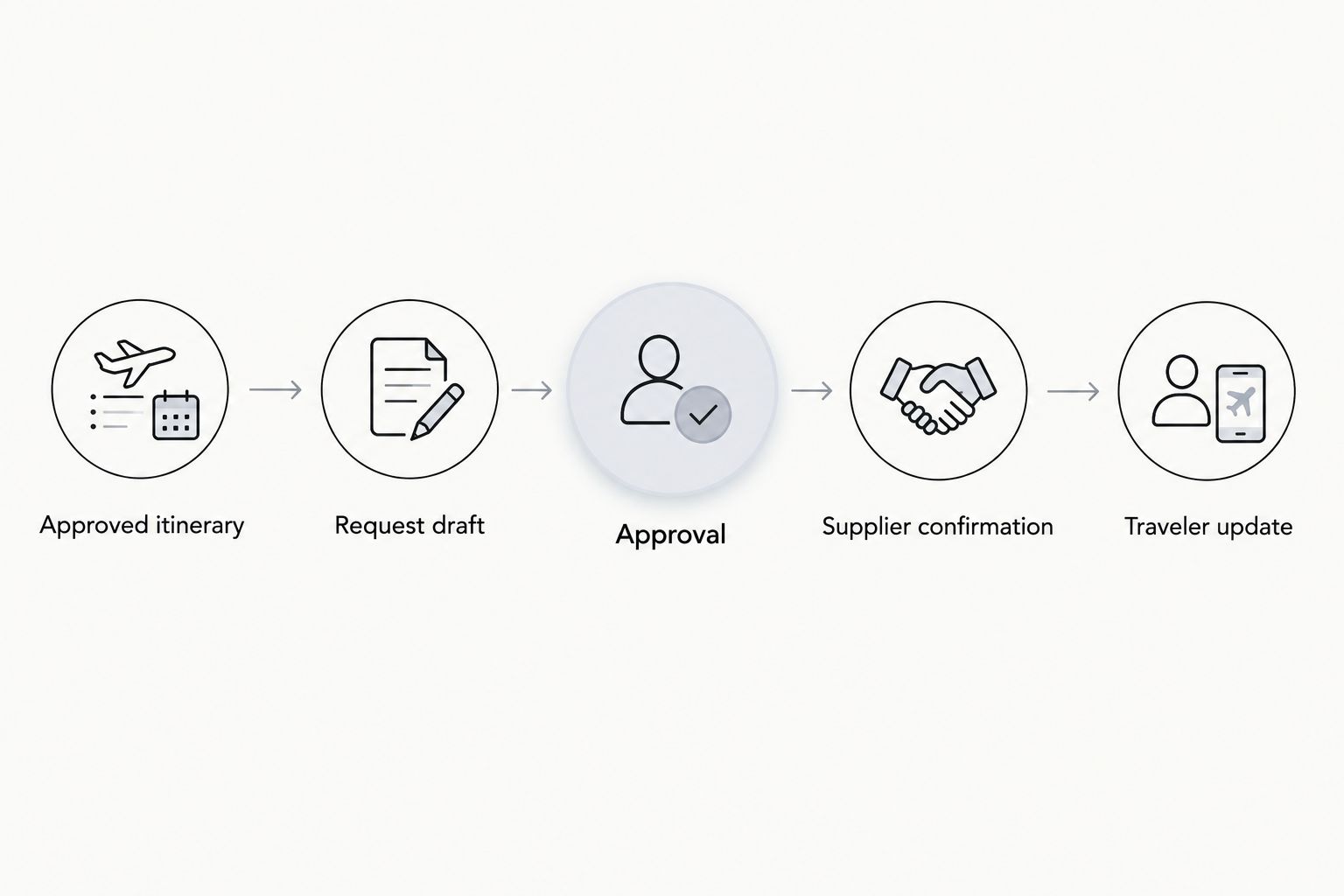
Use this operational sequence: Approved itinerary, Request draft, Approval, Supplier confirmation, Traveler update. Keep each stage distinct even when your chosen connection handles several stages automatically.
Release testing configuration
Test the workflow without creating unintended live bookings. Agree on the testing method with the platform owner and transport provider before sending test requests.
- Run a complete request. Check that an approved journey reaches the intended recipient and that its confirmation returns to the correct record.
- Run 2 exception tests. Use an incomplete pickup instruction and a repeated source event. The first should enter review; the second should not create another booking request.
- Test access boundaries. Confirm that only authorized users can submit requests, approve changes, and view operational traveler information.
- Test manual recovery. Stop the automated path deliberately in the agreed test environment. Confirm that the request owner can find the unresolved record and complete the handoff through an approved alternative.
- Record release ownership. Name the person who monitors failures and the person who can suspend submissions. Include these responsibilities in the 2026 workflow record.
Expected result: You can demonstrate the normal path, exception handling, duplicate protection, and recovery before relying on the connection for executive travel.
Update chauffeur bookings when itineraries change
Treat an itinerary change as a review event, not permission to create another reservation. Retain the original journey reference and attach the revised travel details to it.
- Compare the new itinerary with the last approved version.
- Identify changes to the flight, arrival date, airport, destination, or requested service.
- Hold material changes for the designated approver.
- Send the amendment through the provider’s agreed channel.
- Keep the previous confirmed arrangement visible until the provider accepts the replacement.
Flight tracking and itinerary amendment handling serve different purposes. Tracking an operating flight does not tell the provider that the traveler switched to another flight or changed the destination.
For cancellations, obtain acknowledgment through the agreed process. Removing a flight from the corporate travel platform does not establish that a separate chauffeur booking was canceled.
Troubleshooting
A repeated event creates duplicate requests
Match incoming events against the journey reference and the last submitted version. Route repeated events to the existing record instead of creating another submission. Review any uncertain duplicate with the provider before sending further instructions.
The pickup falls on the wrong date
Check the arrival airport’s local date and the pickup time zone. Keep departure timing separate from arrival timing, particularly when the flight crosses midnight. Ask the coordinator to approve the corrected instruction.
The platform shows success, but transport is unconfirmed
Check what the success status actually represents. A completed export or delivered message is not supplier acceptance. Return the journey to Awaiting confirmation and contact the provider through the agreed escalation channel.
A flight change leaves the chauffeur record unchanged
Check whether the workflow listens for amendments or only new reservations. Reconcile the new flight details against the existing booking, then submit an amendment for acknowledgment. Do not create a replacement booking to bypass the unresolved update.
Billing arrives without an internal allocation
Check whether the approved billing reference survived the field mapping and submission. Resolve the allocation with the billing owner, then correct the mapping for future requests. Preserve the original record rather than silently rewriting its approval history.
Customize your workflow
Extend the process to hourly charters, point-to-point travel, and multi-city movements only after defining the required instructions for each. An airport-arrival template does not capture an entire delegation itinerary.
Chauffyr is best for executive travel teams seeking chauffeur coordination through one 24/7 desk. Its US-based coordination supports worldwide service through vetted chauffeurs and affiliates, with coverage across 120+ airports in 50+ countries.
Chauffyr’s executive chauffeur services include flight tracking and corporate accounts with consolidated billing. Those service capabilities support the operational handoff; they do not establish technical compatibility with your corporate travel platform. Confirm the submission channel, amendment process, and account requirements before implementation.
For your 2026 expansion plan, add service types individually and repeat the release checks. Arrange travel only after the provider confirms the requirements for the actual journey.
FAQ
How do I connect a corporate travel platform to chauffeur bookings?
Connect approved itinerary data to a reviewed transport request, then return the provider’s confirmation to the journey record. Use a supported direct connection, approved middleware, or a structured manual handoff after verifying what both parties accept.
Does Chauffyr have a native corporate travel platform integration?
Verify native integration support directly with Chauffyr before configuring a connection. Chauffeur service coverage does not establish connector availability or permission to automate bookings.
What information should a chauffeur booking request include?
Include the traveler’s operational contact, flight details where relevant, pickup instructions, destination, journey requirements, and authorized billing allocation. Confirm the provider’s required fields before submission.
Can a flight change automatically update my chauffeur booking?
A flight change should trigger review against the existing chauffeur booking. Submit the approved amendment through the agreed channel and obtain acknowledgment before treating the revised arrangement as confirmed.
Is flight tracking enough to manage itinerary changes?
No. Flight tracking follows the identified flight; it does not communicate a new flight selection, destination, passenger requirement, or cancellation instruction.
How do I prevent duplicate chauffeur bookings?
Keep a stable journey reference and match repeated events against the last submitted version. A repeated itinerary message should update or flag the existing record, not automatically create another request.
Who should receive integration failure alerts?
Send failure alerts to the named request owner and an authorized backup. Each alert should identify the affected journey, its current status, and the action needed to resolve it.
One last thing
A successful cancellation deserves the same evidence as a successful booking: supplier acknowledgment. Keep the canceled journey in your operational register with its reference and response. Deleting the record removes the trail your travel and finance teams need to reconcile what happened.