
Instead of manually moving a chauffeur pickup whenever a flight is delayed, arrange a flight-linked booking that updates the arrival estimate and sends changes to a named dispatch contact. Automatic adjustment needs an agreed pickup rule, confirmed dispatch responsibility, and an exception path—not just a flight number attached to a reservation.
- For automatic flight delay pickup adjustment chauffeur bookings, connect flight tracking to a confirmed dispatch rule—not just notifications.
- Chauffyr provides flight tracking and one 24/7 desk; confirm the adjustment process for your specific booking.
- Separate landing time from passenger readiness, and require acknowledgment when a change affects the chauffeur assignment.
- Keep cancellations, diversions, and connection changes outside routine automatic pickup updates.
Why this matters
A delayed arrival changes more than the time on a booking. The chauffeur assignment, meeting instructions, onward appointment, and traveler contact plan must still agree. A flight alert tells you something changed; it does not establish that dispatch accepted a revised pickup.
Use this guide as an operational setup checklist for your 2026 airport-transfer instructions. For service coordination through Chauffyr, request confirmation of how flight tracking affects your particular reservation before treating pickup changes as automatic.
The controlling rule is simple: an updated flight estimate is not a confirmed pickup until the dispatch process accepts it. This guide defines the booking instructions and acceptance checks; it does not assume a particular software integration or booking interface.
Before you start
- Booking and flight details: Have the reservation reference, travel date, arrival airport, flight number, and operating carrier. For a codeshare, identify the operating flight rather than relying only on the marketing flight number.
- Access and ownership: Arrange access to the reservation and flight-status source, or designate a desk that manages both. Record 2 operational contacts: the booking owner and the dispatch contact. Keep the traveler's contact details separately.
- The setup gotcha: Flight tracking does not, by itself, confirm automatic reservation changes, waiting arrangements, or chauffeur reassignment. Ask which changes happen without approval and which require a decision. Resolve that boundary before departure.
Do not begin with a promise to the traveler that every delay is covered. Begin with written instructions that the service provider has accepted. Airport meeting arrangements and booking terms need confirmation for the specific transfer.
Set up the flight-linked booking
Use the bold labels below as fields in your own travel worksheet or booking instructions. They are not claimed to be buttons or settings in a provider's interface.
- Booking reference: Create 1 controlling record for the transfer. Put the reservation reference on every flight-change message so dispatch can match the update without searching by passenger name.
- Operating flight: Record the carrier operating the flight, flight number, arrival date, and arrival airport. Check these against the traveler's current itinerary.
- Local arrival: Record the scheduled arrival in the destination's local time and identify the time zone. Keep the original schedule alongside later estimates rather than overwriting it.
- Traveler readiness: Record whether the traveler expects checked baggage, an arrival formalities process, or assistance that affects the meeting plan. Include only information needed to coordinate the transfer.
- Meeting instructions: Ask dispatch to confirm where the traveler should go and how the traveler will identify the chauffeur. Do not substitute an assumed curb or terminal meeting point.
Expected result: The booking owner and dispatch can identify the same flight, date, destination, and traveler meeting plan from a single record.
For a 2026 worksheet, distinguish the scheduled arrival from the latest operational estimate. Both matter: the first shows what was booked; the second informs the current pickup decision. Retaining both also prevents an old confirmation from becoming the apparent source of truth.
Configure the pickup rule
Choose the pickup reference before asking anyone to automate it. Landing and passenger readiness are different events. Select the rule that matches the traveler's arrival process, then ask dispatch to confirm how it will be applied.
| Pickup rule | Best for | Advantage | Limitation |
|---|---|---|---|
| Flight-linked pickup | A straightforward airport arrival with agreed meeting instructions | Gives dispatch a flight event to follow | Does not establish when the passenger will finish arrival formalities |
| Readiness-confirmed pickup | An arrival with uncertain baggage, formalities, or assistance needs | Uses passenger readiness to inform the final meeting | Requires a working traveler or coordinator contact |
- Pickup reference: Specify whether dispatch should follow the flight's arrival status or wait for a readiness confirmation. Ask what the provider's arrival status represents; do not assume every source uses the same event.
- Arrival allowance: Agree how baggage collection and arrival formalities enter the pickup plan. Record the accepted arrangement without inventing a universal airport buffer.
- Automatic changes: Ask dispatch to list the flight-status changes it can apply without seeking your approval. If dispatch requires approval, define the acknowledgment process rather than describing the booking as fully automatic.
- Approval required: Identify changes that need a booking-owner decision, including a different airport, a different flight, or an altered onward itinerary.
- Traveler instructions: State whether the traveler should follow the existing meeting instructions or wait for an updated message after a change.
Expected result: Everyone knows what changes the pickup, what remains unchanged, and who decides when the ordinary rule no longer fits.
For your 2026 travel procedure, document that distinction in plain language. Avoid an instruction such as “adjust as needed.” It leaves the most consequential decision undefined: whether dispatch can act or must wait.
Configure dispatch acknowledgment
A workable adjustment process connects the flight update to the booking and then to dispatch. Keep the sequence visible so the booking owner can distinguish a received alert from an accepted operational change.
- Flight update: Route the relevant flight-status change to the person or service responsible for monitoring the reservation. If your travel system supports automation, confirm the connection with its administrator before relying on it.
- Booking match: Check that the update belongs to the booked operating flight and arrival date. Stop the update if the flight identity does not match.
- Pickup decision: Apply the agreed pickup reference, or request approval when the event falls outside the accepted rule.
- Dispatch acceptance: Obtain confirmation that dispatch has accepted the revised plan. The confirmation should identify the booking and current meeting instructions.
- Traveler notice: Send the traveler a concise update after acceptance, especially if the meeting point, contact, or required action changed.
Expected result: A flight change produces an accepted pickup instruction, not merely another message in the booking owner's inbox.
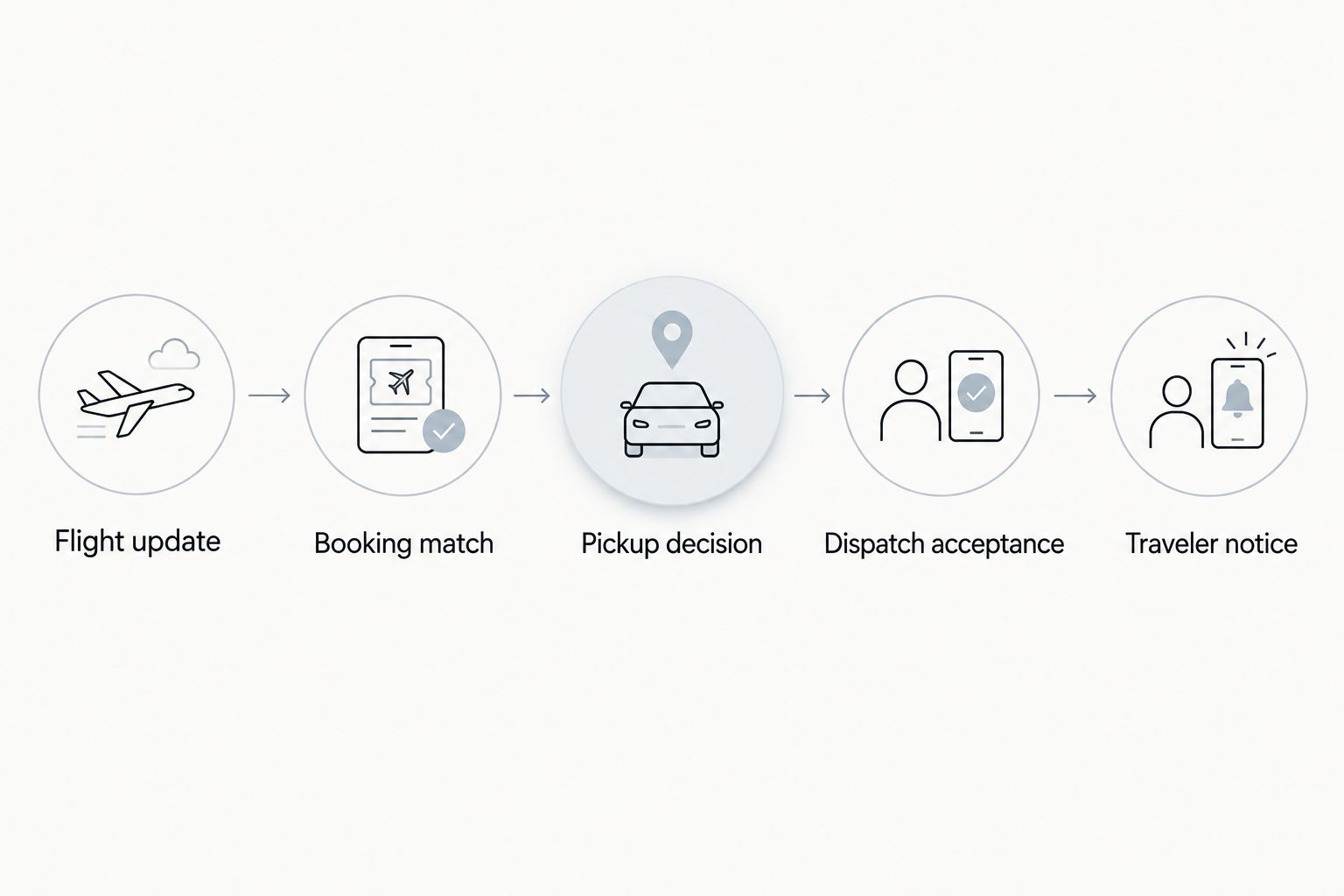
Keep 3 checkpoints in your procedure: before departure, after a material flight change, and before the traveler follows meeting instructions. These are recommended control points, not a claim about any provider's monitoring frequency.
Validate the exception path
Routine delays and changed itineraries need different handling. Use a desk-based walkthrough to establish what happens when the original flight-linked rule stops being sufficient.
- Delay scenario: Ask dispatch to explain how a later arrival estimate changes the pickup. Check whether the booking owner receives confirmation or must approve the change first.
- Earlier-arrival scenario: Confirm whether an earlier estimate triggers the same process. Do not assume earlier and later arrivals receive identical treatment.
- Cancellation scenario: Confirm who pauses the pickup decision while the traveler arranges a replacement flight. A cancellation does not identify the traveler's next arrival.
- Diversion scenario: Identify who authorizes a different arrival airport and revised ground itinerary. Do not let the original pickup instruction stand as approval for a different journey.
- Contact failure: Identify the escalation contact when the traveler cannot respond. Keep the booking owner and dispatch contact available to resolve the meeting plan.
Expected result: Routine updates have an accepted path, and exceptions reach a named decision-maker instead of silently changing the journey.
Add the confirmed process to your 2026 travel instructions. If dispatch cannot acknowledge a proposed workflow, keep manual approval in place. An explicit manual handoff is better than an unverified automatic one.
Adjust pickup when the arrival estimate moves earlier
Earlier arrivals are an adjacent workflow, not simply the reverse of a delay. The traveler might still need baggage collection or arrival formalities, while the original chauffeur assignment follows the booked schedule.
Use the same operating-flight record, then ask dispatch to confirm whether the earlier estimate changes the meeting plan. Keep the existing instructions active until dispatch accepts a replacement. Tell the traveler which instructions currently control.
Best for executive assistants managing changing arrivals: Use a flight-linked update with dispatch acknowledgment when the provider accepts that arrangement. Its advantage is clear ownership; its limitation is that the traveler still needs a readiness and contact plan.
If the traveler changes flights entirely, update the flight identity before adjusting pickup timing. Moving the time on the old flight record leaves the underlying booking wrong.
Troubleshooting
The flight estimate changed, but pickup did not
Check whether the reservation includes flight monitoring only or an accepted pickup-adjustment process. Send the booking reference and current flight details to dispatch, then request acknowledgment of the operative pickup plan. Do not treat a flight-status notification as that acknowledgment.
Dispatch is following the wrong flight
Compare the operating carrier, flight number, destination, and arrival date against the current itinerary. Correct the controlling booking record first, then ask dispatch to confirm the match. Repeating an update without correcting the flight identity preserves the error.
The traveler has landed but cannot meet yet
Keep the traveler on the agreed readiness process. Tell dispatch what has changed and request updated instructions if needed. Do not instruct the traveler to leave baggage or arrival formalities unfinished to meet a schedule built around landing alone.
Different messages show different pickup times
Ask dispatch to identify the accepted instruction by booking reference and destination-local time. Mark superseded messages clearly in your travel record. Give the traveler one current instruction rather than forwarding the entire message chain.
A delay becomes a cancellation or diversion
Stop applying the routine delay rule. Confirm the traveler's replacement flight or destination, obtain approval for the revised journey, and request a new dispatch acknowledgment. Keep onward appointments separate until the ground plan is settled.
Customize your workflow
Extend the process to the next appointment, not just the airport meeting. Record who can move an office arrival, hotel transfer, or onward pickup when the flight changes. Give each change an owner rather than assuming airport dispatch controls the whole itinerary.
For delegation travel, connect each traveler or arrival group to the correct booking reference. Share the ground-movement instructions needed by dispatch without circulating the full delegation itinerary unnecessarily.
Chauffyr is best for executive assistants who need airport transfers coordinated through one 24/7 desk. Chauffyr's airport-transfer service includes flight tracking, with US-based coordination and worldwide service through vetted chauffeurs and affiliates. Confirm the booking-specific adjustment process and airport meeting arrangements; flight tracking alone does not define them.
The benefit is a named coordination channel. The limitation is equally important: do not infer automatic reassignment, waiting terms, or exception approval from the service description.
Arrange your airport transfer
Ask Chauffyr to confirm flight tracking, pickup-change handling, and arrival instructions for your booking.
FAQ
Does flight tracking automatically change my chauffeur pickup time?
Flight tracking alone does not establish that pickup changes automatically. Confirm which flight updates dispatch applies, which require approval, and how the accepted pickup is communicated.
What flight information should I give the chauffeur service?
Provide the operating carrier, flight number, arrival date, arrival airport, and booking reference. Include destination-local arrival details and confirm the meeting instructions separately.
Should pickup follow landing time or passenger readiness?
Use the pickup reference agreed with dispatch for the specific arrival. Landing time does not establish when baggage collection, arrival formalities, or assistance will be complete.
What happens if my flight arrives earlier than expected?
Ask dispatch to confirm whether the earlier estimate changes the accepted pickup plan. Continue using the existing meeting instructions until a replacement is acknowledged.
What should I do if my flight is canceled or diverted?
Move the booking into exception handling rather than applying an ordinary delay adjustment. Confirm the new flight or destination and obtain approval for the revised ground journey.
Can Chauffyr coordinate a delayed airport arrival?
Chauffyr provides airport transfers, flight tracking, and one 24/7 desk. Confirm how those services apply to your booking, including pickup adjustments and traveler meeting instructions.
What should an executive assistant record for airport pickups in 2026?
Record the flight identity, booking reference, pickup rule, dispatch contact, and exception owner. Keep the current accepted instructions distinct from superseded messages.
One last thing
Treat the flight number as a booking identifier, not merely a timing detail. If the traveler rebooks, replace the operating-flight record and reconfirm the arrival date before discussing the new pickup time. A correct time attached to the wrong flight is still an incorrect transfer instruction.